Suddham Sen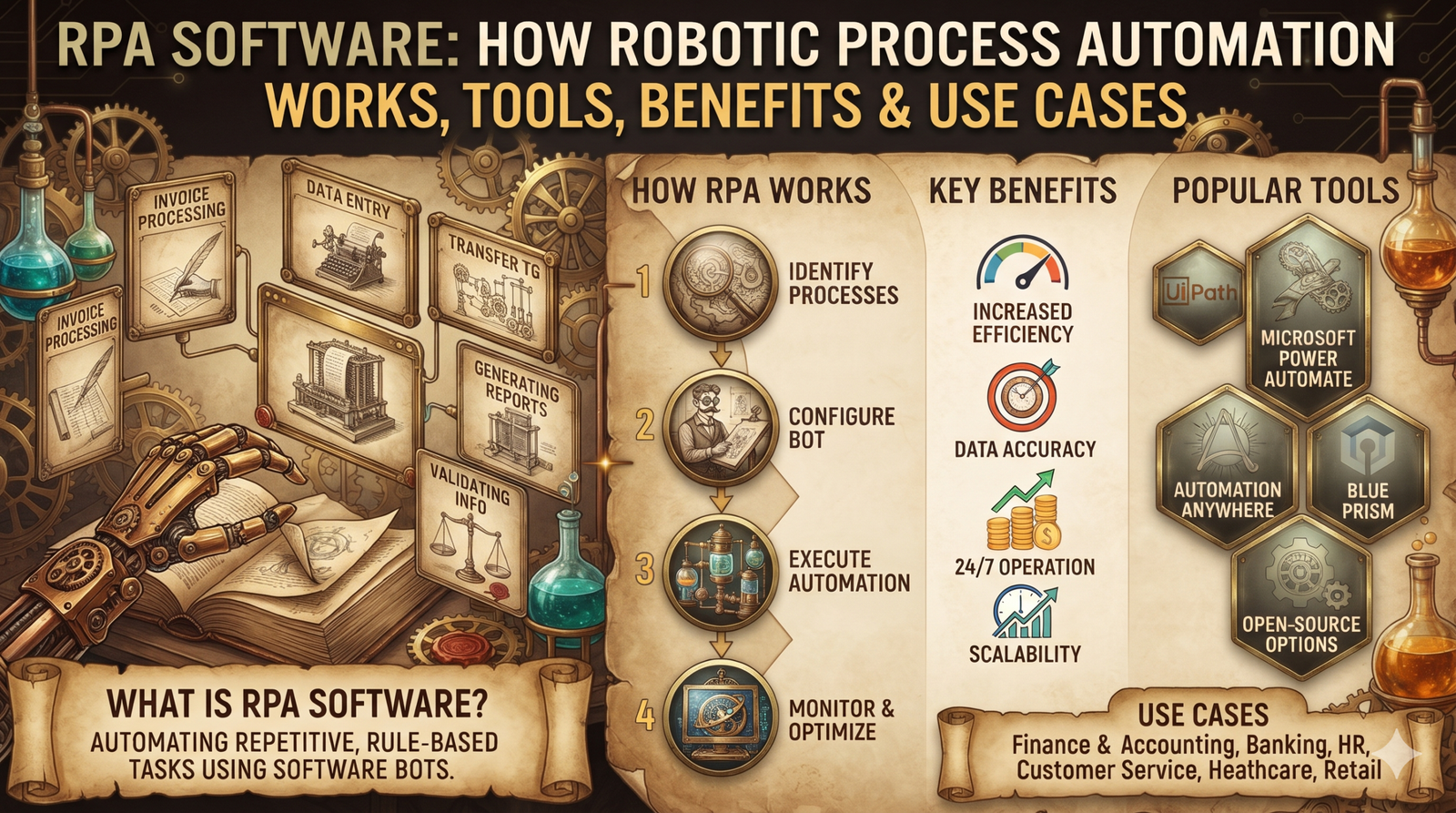
Businesses spend countless hours handling repetitive tasks such as copying data between applications, processing invoices, updating customer records, generating reports, and validating information. Although these activities are necessary, they often consume time that employees could spend on customer service, analysis, and other higher-value work.
RPA software helps businesses automate many of these routine activities by using software bots to perform predefined tasks across digital systems. Instead of manually following the same steps repeatedly, organizations can configure bots to interact with applications, process information, and execute workflows according to established rules.
As companies look for practical ways to improve operational efficiency, robotic process automation (RPA) has become an important part of business automation strategies. It can help reduce manual effort, improve consistency, and accelerate processes without necessarily replacing existing business applications.
This guide explains what RPA software is, how robotic process automation works, the leading RPA tools, its business benefits, common use cases, implementation considerations, and how to choose the right solution.
Table of Contents
What Is RPA Software?
RPA software is a technology that enables organizations to automate repetitive, rule-based tasks using software bots. These bots can interact with digital applications in ways similar to a human user, such as opening systems, entering information, copying data, clicking interface elements, and generating reports.
RPA stands for Robotic Process Automation. Despite the word “robotic,” traditional RPA does not require a physical robot. The automation runs through software on a computer, virtual machine, or supported cloud environment.
For example, consider a finance team that receives hundreds of invoices each week. Employees may need to open each invoice, extract supplier details, enter amounts into an accounting application, and update a tracking spreadsheet.
An RPA bot can automate suitable steps in this workflow, provided the input formats and business rules are sufficiently predictable. Exceptions, such as missing invoice numbers or mismatched totals, can be flagged for human review.
RPA software is commonly used for tasks involving:
- Copying and transferring data between applications.
- Updating customer, supplier, and employee records.
- Processing structured forms and documents.
- Generating scheduled reports.
- Validating information against predefined rules.
- Performing routine actions in enterprise systems.
- Sending notifications and updating workflow statuses.
RPA is particularly useful when a process is repetitive, follows clear rules, and requires interaction with multiple digital systems.
How Does Robotic Process Automation Work?
RPA software works by executing a sequence of configured actions. Depending on the platform and application, bots may interact with user interfaces, supported APIs, databases, files, or other system integrations.
A typical RPA workflow follows several stages.
1. Identify the Process
The organization selects a repetitive business process suitable for automation. The process is examined to understand its steps, inputs, outputs, rules, exceptions, and dependencies.
A process with predictable inputs and clearly defined rules is generally easier to automate than one that requires frequent judgment or negotiation.
2. Configure the Automation
Developers or automation specialists create a workflow using an RPA platform. This may involve visual workflow designers, scripts, reusable components, selectors, or application connectors.
For example, a workflow might open an invoice, read specific fields, validate the supplier ID, enter approved values into an accounting system, and record the result.
3. Execute the Bot
The bot runs the configured workflow in an appropriate environment. Depending on the software, it may run on a desktop, virtual machine, server, or managed cloud infrastructure.
Some bots operate alongside employees, while others execute scheduled jobs independently.
4. Validate Results
The automation checks whether the required actions have completed successfully. It may verify that a record was saved, a report was generated, or a transaction met specific business rules.
Well-designed workflows also identify incomplete actions and unexpected results instead of silently treating every execution as successful.
5. Handle Exceptions
Not every transaction follows the expected path. A bot may encounter missing information, an unavailable application, a changed interface, or a failed login.
The workflow should define how to respond, such as retrying an operation, recording an error, notifying an administrator, or sending the case to an employee for review.
6. Monitor and Maintain the Workflow
RPA deployments require ongoing monitoring. Organizations track execution status, failures, processing volumes, access permissions, and changes in the applications being automated.
When a source application changes its interface or business rules, the automation may need to be updated and retested.
Types of RPA: Attended vs. Unattended Automation
RPA implementations are commonly described as attended, unattended, or a combination of both.
Attended RPA
Attended bots work alongside employees and are typically triggered by a user or an event during a person’s working session.
For example, a customer service representative could launch an attended bot to retrieve customer details from multiple applications and populate a service form.
This approach is useful when automation supports a human decision rather than completing the entire process independently.
Unattended RPA
Unattended bots execute workflows without requiring a person to initiate every transaction. They may run on a schedule, respond to system events, or process queued work.
For example, an unattended bot could collect approved expense records overnight and update a financial reporting system.
These deployments generally require appropriate scheduling, credentials, permissions, monitoring, and exception-handling mechanisms.
Hybrid RPA
Hybrid automation combines attended and unattended workflows. A bot may perform routine processing automatically and send exceptions to an employee for approval or investigation.
This model is useful when a process contains both predictable tasks and decisions that require human judgment.
Best RPA Software and Tools for Businesses
Choosing RPA software depends on the organization’s existing technology stack, process complexity, governance requirements, licensing budget, and technical expertise.
Several platforms are widely used in the robotic process automation market.
1. UiPath
UiPath provides an automation platform for building, deploying, and managing software bots. Its capabilities include workflow development, orchestration, monitoring, and integrations with business applications.
It is worth evaluating for organizations that need to automate multiple processes and manage automation across teams.
Best suited for: Businesses developing a structured RPA program with multiple workflows and centralized management requirements.
2. Microsoft Power Automate
Microsoft Power Automate supports workflow automation across Microsoft services and other connected applications. Its capabilities include cloud flows and desktop automation through Power Automate for desktop.
Organizations can use it to automate supported desktop tasks, coordinate approvals, and connect business applications. Available features and licensing depend on the plan and environment.
Best suited for: Businesses already using Microsoft 365, Windows applications, and compatible Microsoft business services.
3. Automation Anywhere
Automation Anywhere provides enterprise automation capabilities, including bot development, orchestration, and AI-related features within its automation platform.
Organizations evaluating it should consider its application compatibility, security model, deployment options, and suitability for their specific processes.
Best suited for: Businesses looking to coordinate and manage automation across enterprise workflows.
4. SS&C Blue Prism
SS&C Blue Prism focuses on enterprise intelligent automation and robotic process automation. Its platform supports the development and management of automated processes within organizational environments.
It may be relevant for businesses with formal governance, operational controls, and centralized automation requirements.
Best suited for: Organizations prioritizing controlled, managed automation programs.
5. Open-Source and Developer-Oriented Options
Some teams prefer developer-oriented automation tools or open-source frameworks when they need greater flexibility or want to minimize platform licensing costs.
Options such as Robocorp-related tooling and Python-based browser automation can be considered for suitable use cases. However, these approaches are not always equivalent to a full enterprise RPA platform. Teams may need to build additional capabilities for scheduling, credentials, monitoring, governance, and bot management.
Best suited for: Technical teams with the skills to develop and maintain their own automation infrastructure.
Comparing RPA Software Options
| Platform | Key consideration | Potential fit |
|---|---|---|
| UiPath | Bot development and orchestration capabilities | Multi-process automation programs |
| Microsoft Power Automate | Integration with Microsoft services and desktop workflows | Microsoft-oriented business environments |
| Automation Anywhere | Enterprise automation and centralized management | Complex organizational workflows |
| SS&C Blue Prism | Governance and managed enterprise automation | Organizations with formal operational controls |
| Developer-oriented tools | Flexibility and implementation responsibility | Technical teams with custom requirements |
No single RPA platform is ideal for every organization. Before selecting one, test it against a real process and evaluate licensing, integration requirements, security, support, scalability, and the total cost of ownership.
Benefits of RPA Software
Robotic process automation can deliver operational benefits when it is applied to suitable workflows and managed effectively.
1. Reduced Manual Work
RPA bots can perform repetitive actions that would otherwise require employees to follow the same steps repeatedly.
For example, a bot can transfer approved records between applications, allowing employees to focus on exception handling and customer-facing work.
The actual time saved depends on the process, transaction volume, exception rate, and maintenance requirements.
2. Faster Process Execution
A bot can process tasks continuously or run scheduled workloads without the same breaks required by human employees.
This can shorten turnaround times for activities such as report preparation, routine data updates, and high-volume record processing.
However, the overall process may still depend on external system response times, approvals, or other bottlenecks.
3. Greater Consistency
A properly configured bot follows its defined workflow each time it runs. This can reduce variations caused by repetitive manual data entry.
Consistency still depends on the quality of the workflow, the accuracy of input data, and how exceptions are handled.
4. Improved Data Accuracy
RPA can reduce certain types of manual entry mistakes by transferring data automatically and applying validation rules.
It does not guarantee error-free results. A bot may reproduce incorrect source data or apply a flawed rule at scale, so validation and monitoring remain essential.
5. Integration With Existing Systems
RPA can automate interactions between applications that do not have convenient direct integrations or APIs.
This may help organizations connect older systems with newer workflows without immediately replacing their existing infrastructure.
Where reliable APIs or native integrations are available, those approaches may be more stable than automating a user interface.
6. Better Process Visibility
Enterprise RPA platforms can provide execution logs, status reports, and failure information that help teams monitor automated work.
These records can support operational reviews and help identify recurring errors, delays, and opportunities for improvement.
7. Potential Cost Savings
Automation may reduce the labor required for repetitive tasks and improve processing capacity. However, organizations must account for licensing, implementation, infrastructure, maintenance, exception handling, and governance costs.
The financial benefit should be measured using realistic operating data rather than assuming every automated task creates an equivalent reduction in staffing costs.
Real-World RPA Use Cases Across Industries
RPA software can support many business functions. The strongest use cases typically involve repeatable processes with clearly defined rules and measurable outcomes.
Finance and Accounting
Finance teams often handle invoices, reconciliations, expense records, payment updates, and routine reporting.
An RPA bot can retrieve invoice details, validate required fields, compare records against predefined rules, and enter approved information into an accounting system.
Cases involving mismatched amounts, suspicious transactions, or missing approvals should be routed to the appropriate employee.
Banking and Financial Services
Banks and financial service providers may use RPA for administrative tasks such as document handling, account record updates, report preparation, and data transfer between systems.
Automation involving financial transactions, customer identity information, or regulatory requirements needs particularly strong access controls, auditability, and exception management.
Human Resources
HR teams process employee onboarding documents, maintain staff records, update internal systems, and coordinate routine administrative activities.
An RPA workflow might create records in multiple systems after an authorized employee’s onboarding information has been approved.
Sensitive employee data should be accessible only to authorized users and processed according to applicable privacy policies.
Customer Service
Customer service operations frequently involve retrieving information from several applications, updating ticket records, categorizing requests, and sending standard notifications.
RPA can automate these repetitive administrative steps so that agents spend less time switching between systems.
For questions requiring interpretation, empathy, or complex problem-solving, human support remains important.
Healthcare Administration
Healthcare organizations may use automation for administrative workflows such as transferring authorized records, processing routine forms, updating appointment information, and preparing reports.
Healthcare data is sensitive, so any implementation must follow applicable privacy, security, and regulatory requirements. Automated decisions affecting patient care require additional scrutiny.
Retail and E-Commerce
Retailers can use RPA to update inventory records, synchronize product information, process routine order updates, and prepare sales reports.
For example, a bot might compare inventory data from two systems and flag discrepancies for investigation.
Processes that depend on rapidly changing inventory or real-time transactions may be better served by event-driven integrations or direct APIs.
IT Operations
IT teams may automate routine account provisioning steps, ticket updates, system checks, and scheduled reporting.
Any workflow that changes permissions, handles credentials, or affects production systems should include appropriate authorization, logging, and rollback or recovery procedures.
RPA vs. AI-Powered Automation
RPA and artificial intelligence are related, but they solve different problems.
Traditional RPA is strongest when the steps and decision rules are clearly defined. AI can help systems interpret less structured information, recognize patterns, classify content, or generate responses.
For example, a traditional RPA bot may transfer specific fields from a structured form into a business application. An AI component may help extract information from a scanned invoice before the bot validates and enters the results.
This combination is often described as intelligent automation.
| Capability | Traditional RPA | AI-powered automation |
|---|---|---|
| Rule-based task execution | Core strength | Can be combined with rule-based workflows |
| Structured data entry | Well suited | Can assist with validation or interpretation |
| Unstructured document processing | Usually requires additional extraction capabilities | AI can help interpret documents |
| Judgment under uncertainty | Limited to predefined rules | May assist, but requires appropriate validation |
| Predictable execution | Follows configured steps | Results may vary depending on the AI system |
AI does not automatically make a process suitable for automation. Outputs may be incorrect, ambiguous, or inconsistent, so sensitive workflows should use appropriate validation and human oversight.
Businesses should select the simplest reliable technology that meets the process requirements. Sometimes that will be RPA; in other cases, an API integration, workflow platform, AI model, or combination of technologies will be more appropriate.
How Much Does RPA Software Cost?
The cost of RPA software varies considerably based on the platform, licensing model, deployment method, number of bots, execution capacity, and management features.
Some products offer entry-level options, while enterprise deployments may require commercial licenses and additional infrastructure or services. Pricing structures can change, so businesses should confirm current rates directly with vendors.
The total cost of ownership may include:
- Software licenses or subscriptions.
- Implementation and workflow development.
- Infrastructure and environment setup.
- Integration with existing applications.
- Security reviews and governance.
- Testing and ongoing maintenance.
- Monitoring and exception handling.
- Employee training and process documentation.
A lower license price does not necessarily mean a lower overall cost. A tool that requires extensive custom development or frequent maintenance may be more expensive over time than a platform with a higher initial price.
How to Estimate RPA Return on Investment
A practical business case should compare the current cost of a process with the expected cost of operating it after automation.
Start by measuring the time spent on the process, the number of transactions, the frequency of errors, and the cost of handling exceptions. Then estimate the implementation and recurring operating expenses.
A simple calculation is:
Net annual benefit = Annual measurable savings − Annual automation operating costs
If the net annual benefit is positive, the project may provide financial value. A complete assessment should also account for implementation costs, the time required to realize benefits, process risks, and improvements that are difficult to express in monetary terms.
Pilot results are more reliable than broad assumptions about how much time a bot will save.
How to Choose the Right RPA Software
Selecting RPA software begins with understanding the process you want to automate, not with choosing the most popular platform.
1. Evaluate Process Suitability
Choose a process with repeatable steps, sufficient transaction volume, and clear rules. Document the normal workflow and the most common exceptions before building the bot.
If the process is unstable or poorly defined, improve it before automating it.
2. Check Application Compatibility
Confirm that the software supports the applications, browsers, operating systems, and deployment environments involved.
Prefer stable APIs and supported connectors when possible. User-interface automation can become fragile when application layouts change.
3. Review Security and Governance
Assess credential management, role-based access, audit logs, data protection, approval controls, and environment separation.
Bots should receive only the permissions they need, and their activities should be monitored appropriately.
4. Compare Total Cost
Consider licenses, development, infrastructure, maintenance, support, and the cost of handling failures.
Estimate the cost for the expected transaction volume rather than relying only on introductory pricing.
5. Test With a Pilot
Automate one suitable process first. Measure processing time, success rates, exception rates, and maintenance effort before expanding the program.
A pilot also helps uncover issues that may not be obvious during initial planning.
6. Plan for Long-Term Maintenance
Assign ownership for each workflow and establish a process for updating bots when applications or business rules change.
Without clear ownership and monitoring, even a successful automation can become unreliable over time.
Best Practices for Successful RPA Implementation
RPA implementation is a business improvement project as much as a technical exercise.
First, document the existing process and remove unnecessary steps before automating them. Automating an inefficient workflow can make the same inefficiency happen faster.
Second, establish clear success metrics. These may include processing time, transaction volume, error rates, exception rates, and cost per transaction.
Third, design for failure. Bots should log errors, handle expected exceptions, and stop or escalate safely when unexpected conditions occur.
Fourth, protect credentials and sensitive information. Avoid hardcoding passwords or API keys, and use supported credential-management mechanisms.
Finally, involve the employees who understand the process. Their knowledge helps identify unusual cases, operational risks, and improvements that may not be apparent from documentation alone.
A scalable RPA program also needs ownership, testing standards, version control where supported, change management, and periodic reviews of whether each automation is still useful.
Conclusion
RPA software helps businesses automate repetitive, rule-based tasks across digital applications. From invoice processing and employee onboarding to customer service administration and IT operations, robotic process automation can reduce manual effort, improve consistency, and support more efficient workflows.
Platforms such as UiPath, Microsoft Power Automate, Automation Anywhere, and SS&C Blue Prism offer different approaches to building and managing software bots. The right choice depends on existing systems, process requirements, security needs, licensing, and the organization’s automation strategy.
RPA is not the best solution for every business process. Stable APIs, native integrations, conventional workflow automation, or AI-based tools may be more suitable for particular requirements. The most effective automation strategy selects the appropriate technology for each problem.
For businesses considering RPA, the best starting point is a clearly defined, measurable process with predictable rules. Test it through a controlled pilot, validate the results, account for ongoing costs, and expand only when the evidence supports doing so. This approach makes robotic process automation a practical part of a broader business automation strategy.
Get real time update about this category directly on your device, subscribe now.
Have any thoughts?
Share your reaction or leave a quick response — we’d love to hear what you think!
-
 0
0 - 0
- 0
- 0
- 0
- 0