Suddham Sen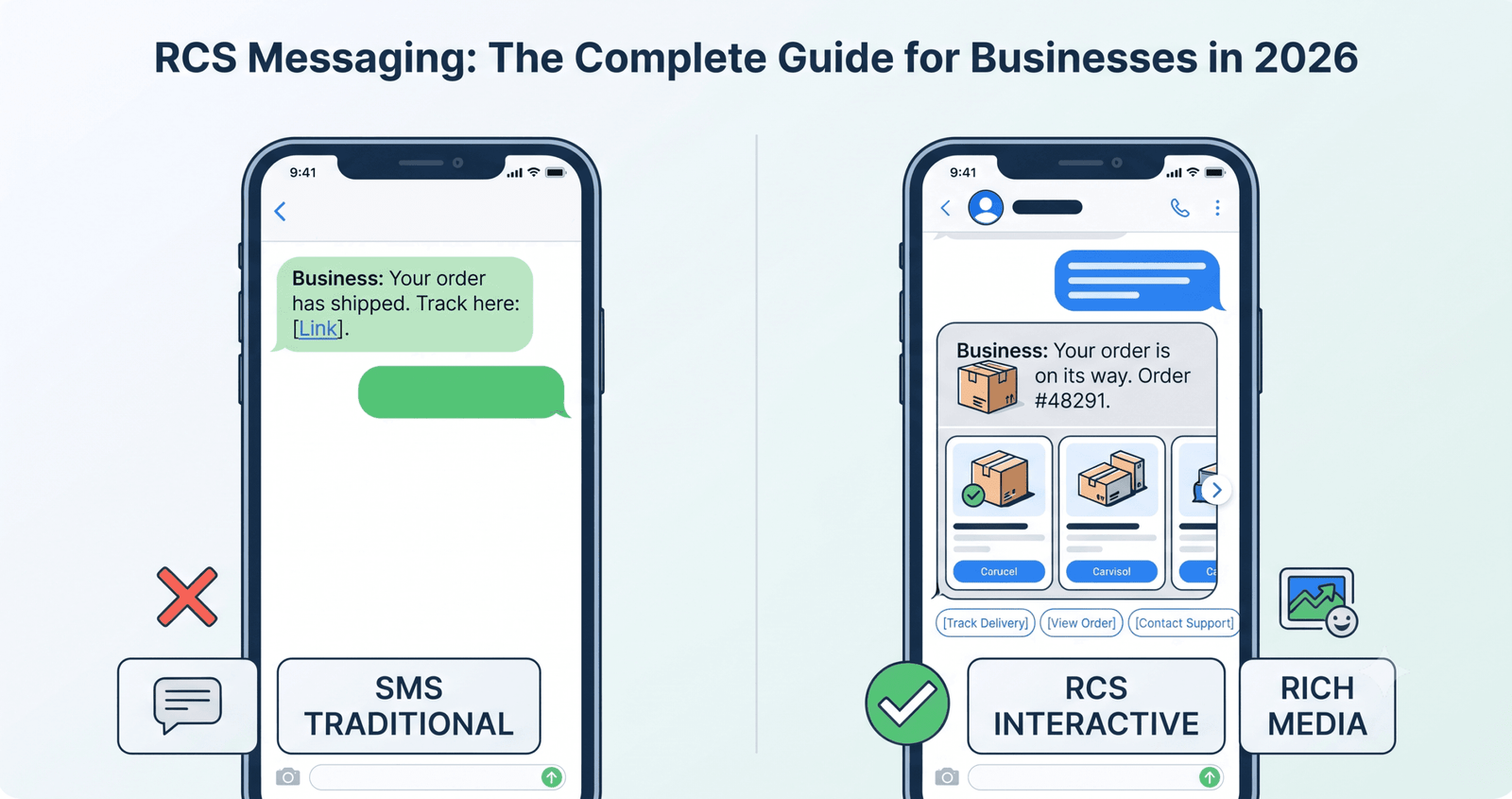
For years, businesses have had one reliable way to reach customers directly on their phones: SMS.
It was simple. Write a message, send it, and wait for the customer to respond.
But customer expectations have changed.
People now expect the same kind of rich, interactive experiences from brands that they get from the apps they use every day. They want to see products, choose options, share information, get instant updates and take action without jumping through unnecessary hoops.
That is where RCS messaging comes in.
RCS, or Rich Communication Services, takes traditional mobile messaging and adds the kind of interactive features businesses have come to expect from modern digital communication. Depending on the device and service, RCS can support rich cards, images, carousels, suggested replies, suggested actions and other conversational features.
More importantly for businesses, RCS is developing into a genuine business messaging channel rather than simply being a newer version of texting.
Google’s RCS for Business platform provides tools and APIs for businesses to create conversational experiences, while Apple and Google have continued expanding RCS across iPhone and Android. In 2026, end-to-end encrypted RCS messaging also began rolling out in beta for supported iPhone and Android users.
So the interesting question isn’t simply what RCS stands for.
It’s what businesses can actually do with RCS messaging that they couldn’t do as effectively with traditional SMS.
Table of Contents
What Is RCS Messaging?
RCS messaging is a richer form of mobile messaging built around the Rich Communication Services standard.
Traditional SMS was designed primarily for short text messages. RCS adds capabilities that make conversations more interactive and visually engaging.
Depending on the supported experience, an RCS message can include:
- Text
- Images and other media
- Rich cards
- Product or service information
- Suggested replies
- Suggested actions
- Carousels
- Links
- Location-related actions
- Calendar actions
- Calling actions
- Read and delivery information
Google’s current RCS for Business documentation supports rich cards that can combine media, titles, descriptions and suggested replies or actions. Multiple cards can also be presented as a carousel.
That changes the role of messaging.
SMS is primarily a communication format. RCS can become an interaction layer.
Instead of sending:
Your order has shipped. Track it here.
a business can potentially create an experience such as:
Your order is on its way.
Order #48291
[Track delivery]
[View order]
[Contact support]
The customer doesn’t have to figure out what to do next.
The message can guide them.
That is the fundamental appeal of RCS messaging for businesses.
Why RCS Messaging Matters to Businesses
The mobile phone is already one of the most direct ways to communicate with customers.
The problem isn’t access.
It’s engagement.
A plain-text message can tell someone something. A richer message can help them do something.
That distinction is becoming increasingly important as businesses compete for attention across email, social media, apps, websites and messaging platforms.
RCS messaging gives businesses another way to make mobile communication more useful without necessarily forcing the customer into a separate app experience.
Consider a few everyday interactions.
A retailer could send a new product announcement with an image and a button to explore it.
A bank could send a transaction alert with an option to contact support.
A travel company could send an itinerary update with a link to the booking.
A healthcare provider could send an appointment reminder with an option to add the appointment to a calendar.
A delivery company could give customers options to track, reschedule or contact support.
The technology isn’t valuable simply because the message looks better.
It’s valuable when the richer format removes friction from the customer’s next step.
RCS Messaging vs SMS: What’s Actually Different?
SMS isn’t disappearing overnight, and businesses shouldn’t treat RCS as a reason to abandon every existing SMS strategy.
The more practical way to think about it is that RCS expands what mobile messaging can do.
| Capability | SMS | RCS Messaging |
|---|---|---|
| Text messaging | Yes | Yes |
| Rich media | Limited | Yes |
| Rich cards | No | Yes |
| Carousels | No | Yes |
| Suggested replies | No | Yes |
| Suggested actions | No | Yes |
| Interactive conversations | Limited | Yes |
| Business branding | Limited | More extensive |
| Delivery/read information | Limited | Supported |
| API integration | Yes | Yes |
| Product-style experiences | Limited | Yes |
Google’s RCS for Business platform supports rich cards, carousels and suggested actions such as opening URLs, dialing numbers, viewing locations and creating calendar events.
That creates a fundamental difference in how businesses can approach messaging.
With SMS, the message often ends with a link.
With RCS, the conversation itself can become part of the customer journey.
RCS Messaging Is More Than “Better Texting”
One of the easiest ways to misunderstand RCS is to think of it as SMS with pictures.
That’s underselling it.
The more interesting part of RCS is the ability to structure a conversation around choices and actions.
Imagine an online retailer sending:
Your saved item is back in stock.
[View product]
[See similar]
[Talk to us]
Or a travel company:
Your flight leaves tomorrow at 8:45 AM.
[View itinerary]
[Check in]
[Contact support]
The customer is given a small set of relevant actions instead of being left to work out the next step.
Google’s current RCS guidance recommends keeping messages clear and concise and making sure each message leads to a meaningful next step. It also recommends using suggested replies and actions where they make the interaction easier.
That is a useful principle for businesses adopting RCS:
Don’t add interactivity just because you can. Add it because it makes the customer’s journey easier.
How RCS Business Messaging Works
RCS Business Messaging is the business-focused application of RCS.
A company can use RCS to create an agent that communicates with customers through supported RCS experiences.
Behind the scenes, that interaction can connect with the company’s existing systems.
A simplified journey might look like this:
Customer action → Business platform → RCS API → RCS message → Customer response → Business system
For example:
- A customer places an order.
- The ecommerce platform records the purchase.
- The messaging system receives the order event.
- The business sends an RCS message.
- The customer receives the update.
- The customer taps an action such as “Track order.”
- The business system processes the interaction.
- The conversation continues.
This is where an RCS API becomes important.
Rather than manually sending individual messages, businesses can connect RCS messaging to the systems they already use.
Google provides APIs and developer resources for RCS Business Messaging, including capabilities for sending messages and determining which RCS features a user’s device supports.
That makes RCS particularly relevant to companies already investing in customer engagement platforms, CPaaS, automation or conversational commerce.
What Can an RCS Message Look Like?
The simplest RCS experience might still be text.
But the format can become much richer.
Rich Cards
A rich card combines several pieces of information into one structured message.
It can include media, a title, description and suggested replies or actions.
For example:
New Summer Collection
Explore lightweight styles designed for everyday travel.
[Shop now]
[View collection]
This format works particularly well when the customer needs a little context before deciding what to do.
RCS Carousels
A carousel allows businesses to present multiple rich cards together.
Think of it as a horizontally scrollable set of choices.
For example:
Choose your plan
Basic
For individuals
Pro
For growing teams
Enterprise
For larger organizations
[Compare plans]
Google’s current RCS documentation supports carousels containing multiple cards so users can compare options and interact with individual cards.
This opens up interesting possibilities for ecommerce, travel, financial services, telecommunications and other businesses with multiple products or choices.
RCS Messaging for Customer Engagement
This is where RCS becomes especially interesting for businesses.
Customer engagement isn’t about sending more messages.
It’s about making each interaction more useful.
RCS can support different stages of the customer journey.
Before a purchase
Businesses can use rich messaging for:
- Product discovery
- New launches
- Promotions
- Recommendations
- Offers
- Appointment booking
During a transaction
RCS can support:
- Order confirmations
- Payment notifications
- Booking information
- Delivery updates
- Account notifications
After a purchase
Businesses can use messaging for:
- Shipping updates
- Delivery tracking
- Returns
- Support
- Feedback
- Reordering
The opportunity is to connect messaging with the systems that already know what the customer is doing.
That is what makes RCS more interesting than simply sending a prettier SMS.
RCS Messaging for Ecommerce
Ecommerce is one of the clearest areas where RCS can make sense.
A traditional promotional SMS might say:
Your favorite products are back. Shop now: [link]
That’s functional, but it leaves most of the experience to the website.
An RCS experience can bring more of that journey into the conversation.
For example:
Back in stock
Your saved jacket is available again.
[View jacket]
[See similar]
[Shop collection]
The customer has choices immediately.
The same principle can work throughout the ecommerce journey.
Discovery: showcase products.
Consideration: help customers compare options.
Purchase: confirm the order.
Fulfillment: provide delivery updates.
Support: give customers relevant actions.
Retention: make repeat purchases easier.
The goal isn’t to turn messaging into a miniature website.
It’s to make the moments where customers need information or action faster and simpler.
RCS Messaging for Customer Support
Customer support is another strong use case because many support interactions follow predictable paths.
Consider a delivery issue.
Instead of:
We couldn’t deliver your order. Please call customer service.
an RCS conversation could provide:
We couldn’t deliver your order today.
What would you like to do?
[Reschedule]
[Change address]
[Contact support]
The customer immediately sees the available options.
For more complex issues, the conversation can transition to a human agent.
Google’s business messaging tools support conversational flows involving automated responses as well as live-agent handoffs.
That creates an opportunity to automate the repetitive parts of customer service while keeping a human available when the situation actually requires one.
RCS API: Connecting Messaging to Your Business Systems
For enterprises, the RCS API is one of the most important pieces of the puzzle.
A business doesn’t want someone manually composing every delivery notification or appointment reminder.
It wants its existing systems to trigger the appropriate communication automatically.
For example:
CRM → Customer event → Messaging platform → RCS API → Customer
Or:
Ecommerce platform → Order shipped → RCS message
Or:
Booking system → Appointment approaching → RCS reminder
This makes RCS a component of a larger customer engagement architecture.
Google’s RCS for Business APIs provide functionality for messaging and for checking the capabilities supported by a user’s RCS client.
That capability checking matters because RCS experiences are not identical across every device, carrier and environment.
A good implementation therefore needs to know what the recipient can actually receive.
RCS and the Importance of Fallback
One of the biggest mistakes businesses can make is treating RCS as an all-or-nothing replacement for SMS.
A better strategy is to think in terms of capability and customer experience.
If a customer can receive the intended RCS experience, use it.
If the customer cannot, use an appropriate fallback.
This is particularly important for large-scale messaging campaigns.
Google’s RCS Business Messaging APIs include a capability-checking mechanism that returns the RCS features supported by a user’s device.
That allows businesses to design messaging journeys around what the recipient can actually experience.
The result is a more resilient strategy:
RCS when available. Appropriate fallback when it isn’t.
RCS on iPhone and Android
RCS has become considerably more relevant as support has expanded across mobile platforms.
Apple introduced RCS support on iPhone, and in May 2026 Apple announced the beginning of beta rollout for end-to-end encrypted RCS messaging between supported iPhone and Android devices. Apple said the rollout was being introduced for iPhone users on iOS 26.5 with supported carriers and Android users on the latest version of Google Messages.
That development matters to businesses because cross-platform messaging is far more useful when a customer base isn’t concentrated on a single mobile operating system.
There are still practical considerations around device, carrier, region and feature support, which is why capability detection remains important for business messaging implementations.
But the direction is clear:
RCS is becoming a much more significant part of the cross-platform messaging landscape.
RCS vs WhatsApp: Should Businesses Choose One?
RCS and WhatsApp Business aren’t interchangeable.
They operate within different messaging ecosystems and can serve different purposes.
WhatsApp has its own application environment and an enormous established user base.
RCS is integrated into supported native messaging experiences.
For businesses, that means the question shouldn’t necessarily be:
RCS or WhatsApp?
A better question is:
Where is this customer, and which channel creates the least friction for this particular interaction?
A mature customer communication strategy may use several channels:
- RCS
- SMS
- Push notifications
- In-app messaging
- Voice
The best channel depends on the customer, the use case and the desired action.
RCS is particularly interesting when a business wants to combine the reach of mobile messaging with richer, more interactive experiences.
RCS Messaging and Conversational Marketing
Marketing has changed.
The old model was largely:
Send message → provide link → hope customer converts.
Conversational marketing moves closer to:
Start conversation → understand intent → provide options → help customer act.
RCS fits naturally into that second model.
Imagine a customer receiving:
Looking for a new mobile plan?
[Show plans]
[Compare options]
[Talk to an expert]
The customer doesn’t have to search for the right page.
The conversation can become the entry point.
That can make RCS particularly useful for businesses with products or services that require consideration rather than an immediate one-click purchase.
How to Design RCS Messages That People Actually Want to Read
Having rich messaging capabilities doesn’t mean every message should be packed with buttons, images and animations.
In fact, that can make a conversation worse.
The strongest RCS experiences tend to be simple.
Give every message a purpose
Before sending an RCS message, ask:
What does the customer need to know?
Then:
What should they be able to do next?
If those two things aren’t clear, the message probably isn’t ready.
Keep the copy conversational
Nobody wants to read a corporate brochure inside a messaging app.
Use straightforward language.
Instead of:
We are pleased to inform you that your previously requested shipment has now been successfully dispatched from our fulfillment facility.
Try:
Good news — your order is on its way.
The second version sounds like something a person would actually say.
Don’t overload the customer with choices
More buttons don’t automatically mean more engagement.
Google’s current RCS guidance recommends relevant, concise suggested replies and actions rather than overwhelming users with options.
Give people the next few useful choices.
Not every possible choice.
Make the first action obvious
If a customer receives a product recommendation, the primary action should be immediately understandable.
If they receive a delivery notification, “Track order” probably matters more than six unrelated options.
The best RCS experience feels almost effortless.
RCS Messaging and Personalization
RCS becomes even more useful when it is connected to customer data responsibly.
Instead of sending the same generic message to everyone, businesses can use relevant context.
For example:
Your order is arriving tomorrow.
Your booking is confirmed for September 18.
The product you saved is back in stock.
Your appointment starts in two hours.
The important word here is relevant.
Personalization should make the message more useful, not make the customer feel like the business knows too much.
As with any customer communication channel, businesses need to consider consent, data protection, security and applicable regulations when designing automated messaging journeys.
RCS Messaging Analytics: Measuring More Than Delivery
One advantage of a modern business messaging platform is the ability to look beyond whether a message was simply sent.
Businesses can evaluate the performance of the customer journey.
Depending on the implementation and available capabilities, useful measurements can include:
- Message delivery
- Read activity
- Customer responses
- Suggested-action interactions
- Conversation completion
- Website visits
- Lead generation
- Purchases
- Support resolution
- Customer satisfaction
Google’s business messaging documentation describes delivery and read receipts as part of its messaging capabilities, while its RCS Business Messaging ecosystem provides tools for building and measuring conversational experiences.
The most useful metric, however, isn’t necessarily the number of messages sent.
It’s what happened after the message.
If an RCS campaign generates twice as many interactions but no additional business value, it isn’t necessarily a better campaign.
The goal is better customer outcomes.
RCS Security and Privacy
Security matters more as messaging becomes more capable.
In May 2026, Apple announced that end-to-end encrypted RCS messaging had begun rolling out in beta for supported cross-platform conversations, following collaboration between Apple and Google and other industry participants.
For businesses, however, message encryption is only one part of the security picture.
An RCS implementation also needs to consider:
- API authentication
- Customer data
- Access controls
- Consent
- Data retention
- Business verification
- Secure integrations
- Regulatory requirements
Google’s RCS for Business documentation is also introducing additional verification-token requirements for certain agent launches, with enforcement timing still to be announced as of September 2026.
That is a good reminder that RCS isn’t simply a marketing plug-in.
For enterprise use, it needs to be treated as part of the broader technology and customer-data environment.
What Businesses Should Look for in an RCS Messaging Platform
Choosing an RCS solution isn’t just about asking whether it can send an RCS message.
The more important questions are about what happens around the message.
Look for capabilities such as:
API integration
Can the platform connect to your CRM, ecommerce platform, support system or other business applications?
Capability detection
Can it determine whether a recipient supports the RCS features you want to use?
Automation
Can customer events trigger messages automatically?
Rich messaging
Can you use cards, media, carousels and suggested actions where appropriate?
Conversation handling
Can automated conversations hand off to a human when necessary?
Analytics
Can you understand what customers did after receiving a message?
Fallback
Can the platform support an appropriate alternative when RCS isn’t available?
Security and compliance
Can the implementation meet your company’s security, privacy and regulatory requirements?
The technology should fit into the customer journey, not become another disconnected messaging tool.
The Future of RCS Messaging
The most interesting thing about RCS isn’t any single feature.
It’s the direction of the platform.
Messaging is moving from a simple notification mechanism toward a place where customers can discover, choose, ask, confirm and act.
Google’s RCS for Business documentation continues to evolve, with ongoing changes to the platform and its developer capabilities. Its recent releases include changes designed to make links in rich-card and carousel actions more transparent to users.
At the same time, cross-platform RCS is becoming more capable as Apple and Google continue working toward broader encrypted messaging experiences.
That combination creates an interesting opportunity for businesses.
The mobile inbox is already somewhere customers look.
RCS makes it possible to do considerably more once they get there.
Is RCS Messaging Worth It for Businesses?
For businesses that already rely heavily on SMS, customer notifications or conversational communication, RCS messaging is worth serious consideration.
But the strongest business case isn’t:
“RCS messages look better.”
It’s:
“RCS can make customer interactions easier.”
A delivery update can become a tracking interaction.
A product announcement can become a shopping journey.
An appointment reminder can become a confirmation.
A support notification can become a conversation.
A promotional message can become an interactive product discovery experience.
That is the difference between treating RCS as another messaging format and treating it as a customer engagement channel.
RCS Messaging Is the Next Step in Business Communication
SMS succeeded because it was simple.
RCS has the opportunity to succeed for a different reason: it can combine that simplicity with a much richer interaction model.
Businesses don’t need customers to learn a new interface.
They don’t necessarily need customers to download another app.
They can meet customers in a familiar messaging environment and give them more useful ways to interact.
That’s why RCS messaging deserves attention from companies building their next customer communication strategy.
The opportunity isn’t to send more messages.
It’s to send better, more relevant messages that help customers do something useful.
For businesses, that could mean better engagement, smoother customer journeys and a more natural bridge between messaging and digital experiences.
And as RCS continues to expand across devices, platforms and business use cases, the companies that start thinking about it as a customer experience channel—not simply an SMS replacement—will be in the best position to take advantage of it.
Get real time update about this category directly on your device, subscribe now.
Have any thoughts?
Share your reaction or leave a quick response — we’d love to hear what you think!
-
 0
0 - 0
- 0
- 0
- 0
- 0