Suddham Sen
Businesses in India are increasingly using WhatsApp to send order updates, answer customer questions, share product information, recover abandoned carts and manage support conversations. The WhatsApp Business Platform makes these activities possible at scale, but its pricing can be confusing when you are setting it up for the first time.
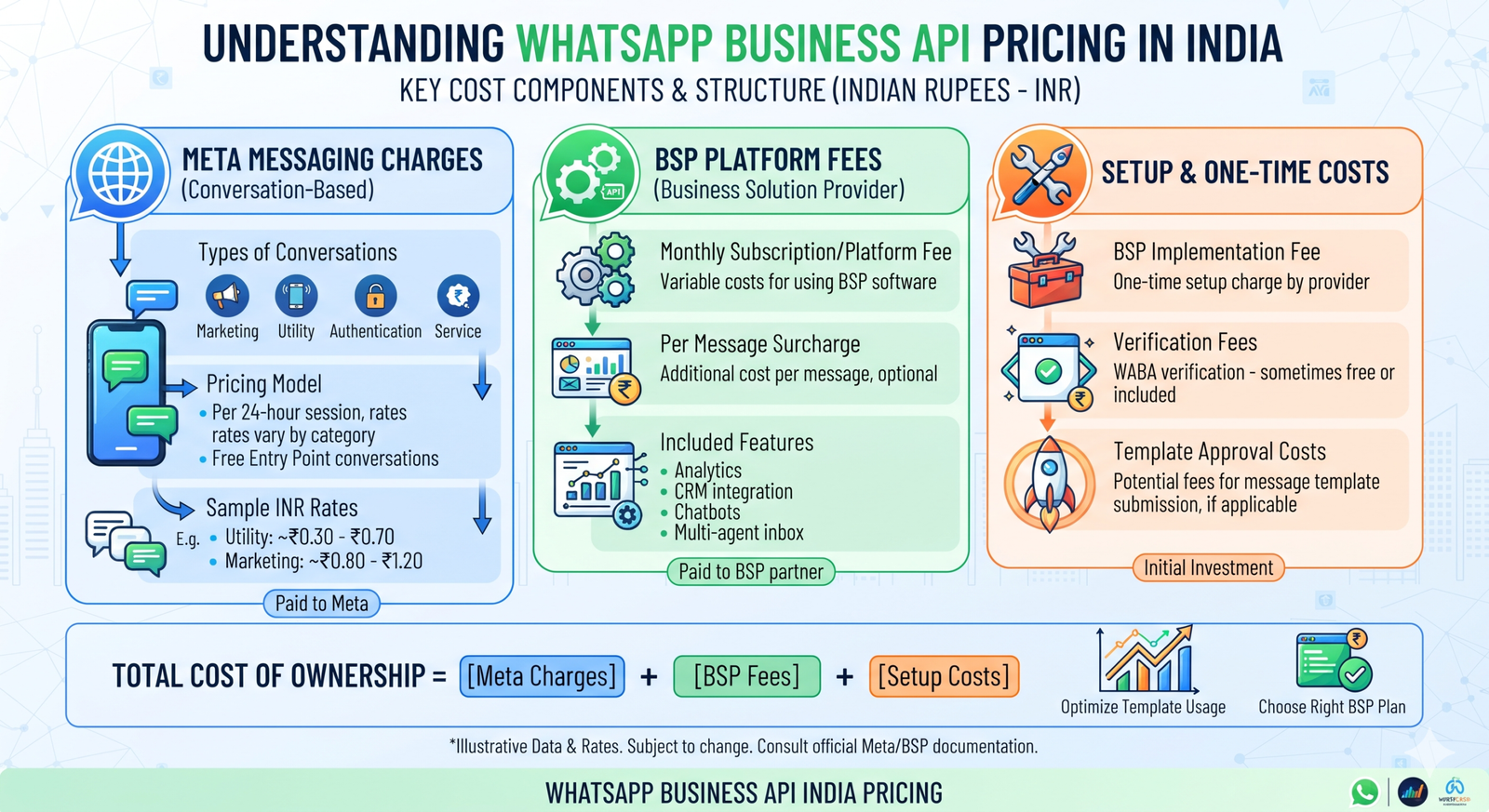
The main reason is that WhatsApp Business API pricing is not always one flat monthly fee. Your total cost may include Meta’s messaging charges, a fee from your Business Solution Provider (BSP) or platform, and additional expenses for setup, integration or ongoing support.
This guide explains how WhatsApp Business API pricing works in India in 2026, what businesses should include in their budget, and how to compare providers without overlooking hidden costs.
Pricing note: Meta’s rates and provider fees can change. Confirm the applicable India rate card and your provider’s current quotation before making a purchasing decision. The figures in a provider’s proposal may not represent Meta’s charges alone.
Table of Contents
What Is the WhatsApp Business API?
The WhatsApp Business Platform, commonly called the WhatsApp Business API, is designed for businesses that need to communicate with customers at scale or connect WhatsApp with their existing software.
Unlike the WhatsApp Business app, the platform can support integrations with:
- Customer relationship management (CRM) systems
- Customer support and ticketing tools
- E-commerce platforms
- Marketing automation systems
- Order management and logistics software
- Chatbots and conversational AI tools
For example, an online store can use the platform to send order confirmations and delivery updates automatically. A service business can route incoming customer queries to a support team, while a sales team can manage opted-in leads through an integrated inbox.
The API itself is not a standalone messaging app with a ready-made interface. Businesses generally access it through a direct integration or a platform provider that supplies an inbox, automation tools, analytics and other features.
How Does WhatsApp Business API Pricing Work in India?
Your WhatsApp Business API cost usually has more than one component. It is important to separate Meta’s charges from the fees charged by the provider helping you use the platform.
1. Meta messaging charges
Meta sets the underlying pricing for messages delivered through the WhatsApp Business Platform. The applicable rate depends on factors such as the recipient’s country and the message category.
The main message categories are:
| Message category | Typical business use |
|---|---|
| Marketing | Promotions, product announcements, offers and re-engagement |
| Utility | Order confirmations, payment updates, appointment reminders and delivery notifications |
| Authentication | One-time passwords and account verification |
| Service | Customer-initiated support conversations |
These categories are not interchangeable. A promotional message should not be classified as a utility message simply because it contains an order-related detail. Businesses need to follow Meta’s template and messaging policies.
An important pricing detail: Meta’s pricing model has changed over time. Businesses should check the current rate card rather than rely on older articles that describe a universal conversation-based charge. Under the per-message model, eligible delivered template messages are charged according to their category and the recipient’s market. Certain service interactions and qualifying free-entry-point windows may have different treatment.
2. Business Solution Provider or platform fees
Many businesses use a Business Solution Provider (BSP) or WhatsApp platform to avoid building and maintaining the entire integration themselves.
Depending on the provider, charges may include:
- A monthly or annual subscription
- A fee based on the number of agents
- A fee based on message volume
- Charges for automation or chatbot features
- Fees for additional phone numbers or workspaces
- Premium support or onboarding
Some providers advertise a low monthly subscription, while others offer usage-based plans or custom enterprise pricing. Check exactly what the plan includes before comparing headline prices.
3. Setup and integration costs
There may also be one-time or project-based costs when you start using the platform.
These can include:
- WhatsApp Business Platform onboarding
- Business and phone-number configuration
- CRM or e-commerce integration
- Chatbot development
- Template creation and testing
- Agent training
- Data migration and workflow configuration
A business using a standard shared inbox may have limited setup requirements. A company connecting WhatsApp to an ERP, CRM, order system and internal support workflow may need a more substantial integration project.
4. Optional add-ons
Some platforms charge separately for features such as advanced analytics, AI-powered automation, additional integrations, campaign management or dedicated technical support.
Ask providers to identify optional add-ons clearly. A feature shown in a product demonstration may not be included in the base subscription.
WhatsApp API Pricing in India: What Should You Budget For?
There is no single total price that applies to every Indian business. Your monthly bill depends on how many messages you send, which categories you use, the countries you message and the platform you choose.
A practical budget should separate the following costs:
| Cost component | How it may be charged |
|---|---|
| Meta messaging | Based on applicable message category and recipient market |
| Platform or BSP | Monthly, annual, agent-based or usage-based fee |
| Setup | One-time onboarding or integration fee |
| Automation | Included in a plan or charged as an add-on |
| Support | Included, tiered or separately billed |
| Integrations | One-time development or recurring connector fee |
Example: Estimating a monthly WhatsApp API bill
Imagine an Indian online retailer that sends order updates and promotional messages and receives customer support enquiries.
Its monthly estimate should account for:
- The number of marketing template messages delivered.
- The number of utility template messages delivered.
- The number of authentication messages, if applicable.
- Any applicable service-message charges.
- The provider’s subscription or usage fee.
- Additional automation, integration or support costs.
The calculation can be represented as:
Estimated monthly cost = Meta messaging charges + provider fees + add-ons + applicable taxes
For a per-message rate card, the Meta portion can be estimated as:
Meta messaging cost = (Marketing messages × applicable marketing rate) + (Utility messages × applicable utility rate) + (Authentication messages × applicable authentication rate)
Use the current India rate card for each category. Do not use one blended rate for all messages unless your provider has clearly explained how that rate is calculated.
Also check whether the provider’s quotation includes GST, whether it applies a markup to Meta charges, and whether unused subscription credits expire.
What Factors Affect WhatsApp Business API Costs?
Two businesses can send a similar number of messages and still receive different bills. These are the main reasons.
Message category
Marketing, utility and authentication messages have different pricing treatment. A campaign that sends promotional offers may cost differently from a workflow that sends order updates.
Recipient country
The destination market matters. An Indian business messaging customers in several countries should not assume that the India rate applies to every recipient.
Message volume
Higher messaging volumes can increase Meta charges, but they may also affect the platform plan you need. Some providers offer volume-based pricing, while others use fixed subscription tiers.
Customer-initiated interactions
Customer-initiated support and eligible free-entry-point interactions may receive different treatment under Meta’s rules. Businesses should understand the applicable service window and eligibility conditions rather than assume every reply is free.
Number of agents
A support team with several agents may need a multi-agent inbox. Some providers include a fixed number of users in their subscription and charge extra for additional seats.
Automation and integrations
A basic notification workflow is generally simpler than a system that connects WhatsApp to inventory, payments, CRM records and support tickets. More complex workflows can increase development and maintenance costs.
WhatsApp Business API vs WhatsApp Business App: Is the API Worth the Cost?
The free WhatsApp Business app is suitable for many small businesses that manage conversations manually. The Business Platform is more appropriate when communication needs to be automated, integrated or handled by a larger team.
| Feature | WhatsApp Business app | WhatsApp Business Platform |
|---|---|---|
| Best suited for | Small businesses and individual operators | Growing and larger businesses |
| Customer conversations | Managed in the app | Managed through an integrated platform or custom interface |
| Automation | Basic features | API-based workflows and integrations |
| CRM integration | Limited or dependent on external tools | Can be built into the integration |
| Team support | Limited shared-device capabilities | Multi-agent options through providers |
| Bulk communication | Limited business-app capabilities | Approved template messaging subject to policies |
| Pricing | Free app | Meta messaging charges and possible provider fees |
The API is not automatically the better choice for every business. If your team handles a manageable number of conversations manually, the app may be enough. If you need automated notifications, structured support routing or integration with business systems, the platform may justify its additional cost.
How to Choose a WhatsApp Business API Provider in India
Choosing a provider based only on its advertised monthly price can lead to unexpected expenses. Compare the complete service and pricing structure.
1. Understand the complete fee structure
Ask for a written breakdown of Meta messaging charges, platform fees, agent charges, onboarding costs, add-ons and taxes.
A provider should make it clear which charges are passed through from Meta and which are its own fees.
2. Check the features included in the plan
Confirm whether the plan includes:
- A shared team inbox
- Message template management
- Campaign tools
- Chatbot or workflow automation
- Contact management
- Delivery and engagement reports
- CRM or e-commerce integrations
- Role-based access and team controls
Do not pay for an advanced feature set if your business only needs basic notifications and a shared inbox.
3. Review integration options
If WhatsApp needs to connect with your CRM, website, e-commerce store or internal software, check whether the provider offers a ready-made integration or requires custom development.
Ask about API documentation, webhooks, implementation timelines and ongoing maintenance.
4. Check support and reliability
A messaging platform can become an important part of customer operations. Ask about support hours, escalation procedures, onboarding assistance and how service interruptions are handled.
For high-volume or time-sensitive messaging, reliability and support quality should be part of the buying decision.
5. Review compliance and account ownership
Make sure the business retains appropriate access to its Meta Business Portfolio, WhatsApp Business Account, phone number and relevant business assets.
Review the provider’s data handling practices, user permissions, account migration process and support for Meta’s messaging policies. Avoid arrangements that leave your business unable to manage or transfer its own account.
How to Set Up the WhatsApp Business API in India
The setup process varies depending on whether you integrate directly or work with a provider. A typical implementation follows these steps.
Step 1: Prepare your business details
Keep your business information ready, including the legal business name, website, contact details and other information required for Meta business verification.
Step 2: Choose direct integration or a provider
A business with in-house development resources may choose a direct Cloud API integration. A business that needs a ready-made inbox, campaign management or automation may prefer a provider.
Compare the total cost of ownership, not just the initial setup fee.
Step 3: Configure your WhatsApp Business Account
Follow the onboarding process to create or connect your WhatsApp Business Account and configure the business phone number. Check the current eligibility and migration requirements if the number is already being used with another WhatsApp product.
Step 4: Complete verification and business setup
Complete the applicable business verification and display-name review requirements. The exact steps depend on your account and Meta’s current onboarding process.
Step 5: Create and submit message templates
Template messages used to initiate business communication must follow Meta’s policies and approval process. Choose the correct category and make sure the content reflects the actual purpose of the message.
Step 6: Connect your systems and test workflows
Connect your CRM, website, order management system or support software as needed. Test message delivery, customer replies, opt-outs, webhook events and agent handovers before launching at scale.
Step 7: Monitor usage and costs
Track delivered messages by category, provider charges, failed messages and campaign performance. Review the bill regularly to identify unexpected usage or workflows that are sending unnecessary messages.
Common Mistakes That Increase WhatsApp API Costs
A well-designed WhatsApp workflow can make communication more efficient. Poorly planned usage can increase costs without improving the customer experience.
Watch out for these mistakes:
- Sending unnecessary promotional messages: Frequent campaigns can increase spending and annoy customers. Segment audiences and send relevant communication.
- Using the wrong template category: Template classification should reflect the actual purpose of the message and follow Meta’s rules.
- Ignoring provider add-ons: A low base subscription may not include the automation, integrations or agent seats your team needs.
- Building automation without a clear use case: Automate workflows that solve a real problem, such as order updates or routine support queries.
- Failing to monitor delivery: Track delivery and failure reports rather than judging performance only by the number of messages submitted.
- Overlooking consent and opt-outs: Maintain appropriate customer permissions and honour opt-out requests. Follow applicable privacy, telemarketing and platform requirements.
- Not reviewing invoices: Reconcile provider invoices against message usage and the agreed pricing structure.
Is WhatsApp Business API Worth It for Indian Businesses in 2026?
For businesses that rely on customer communication, the WhatsApp Business Platform can be valuable when it reduces manual work, improves response management or connects conversations with existing business processes.
It can be particularly useful for:
- E-commerce businesses sending order and delivery updates
- Retailers sharing relevant product information with opted-in customers
- Banks and financial service providers managing eligible notifications and authentication workflows
- Travel and hospitality businesses handling bookings and customer enquiries
- Education companies sending application and schedule updates
- Service businesses coordinating appointments and support requests
The business case should be measured against clear outcomes: support response time, successful delivery of important notifications, agent productivity, conversion performance and the cost of handling customer interactions.
For a small business with low message volume, the platform subscription and integration effort may not be justified yet. For a growing business managing multiple customer touchpoints, automation and integration may offer enough operational value to make the investment worthwhile.
Final Thoughts
WhatsApp Business API pricing in India in 2026 depends on more than the number of messages your business sends. Meta’s category-based messaging charges, provider subscriptions, setup work, integrations and optional features can all affect the final bill.
Before choosing a platform, calculate your expected message volume by category, check the current Meta rate card, and request a transparent provider quotation. Compare the complete monthly cost alongside features, support, integration options and account ownership.
The right solution is not necessarily the cheapest plan. It is the one that gives your business the messaging capabilities it needs, with predictable costs and room to grow.
Get real time update about this category directly on your device, subscribe now.
Have any thoughts?
Share your reaction or leave a quick response — we’d love to hear what you think!
-
 0
- 0
- 0
- 0
- 0
- 0