Suddham Sen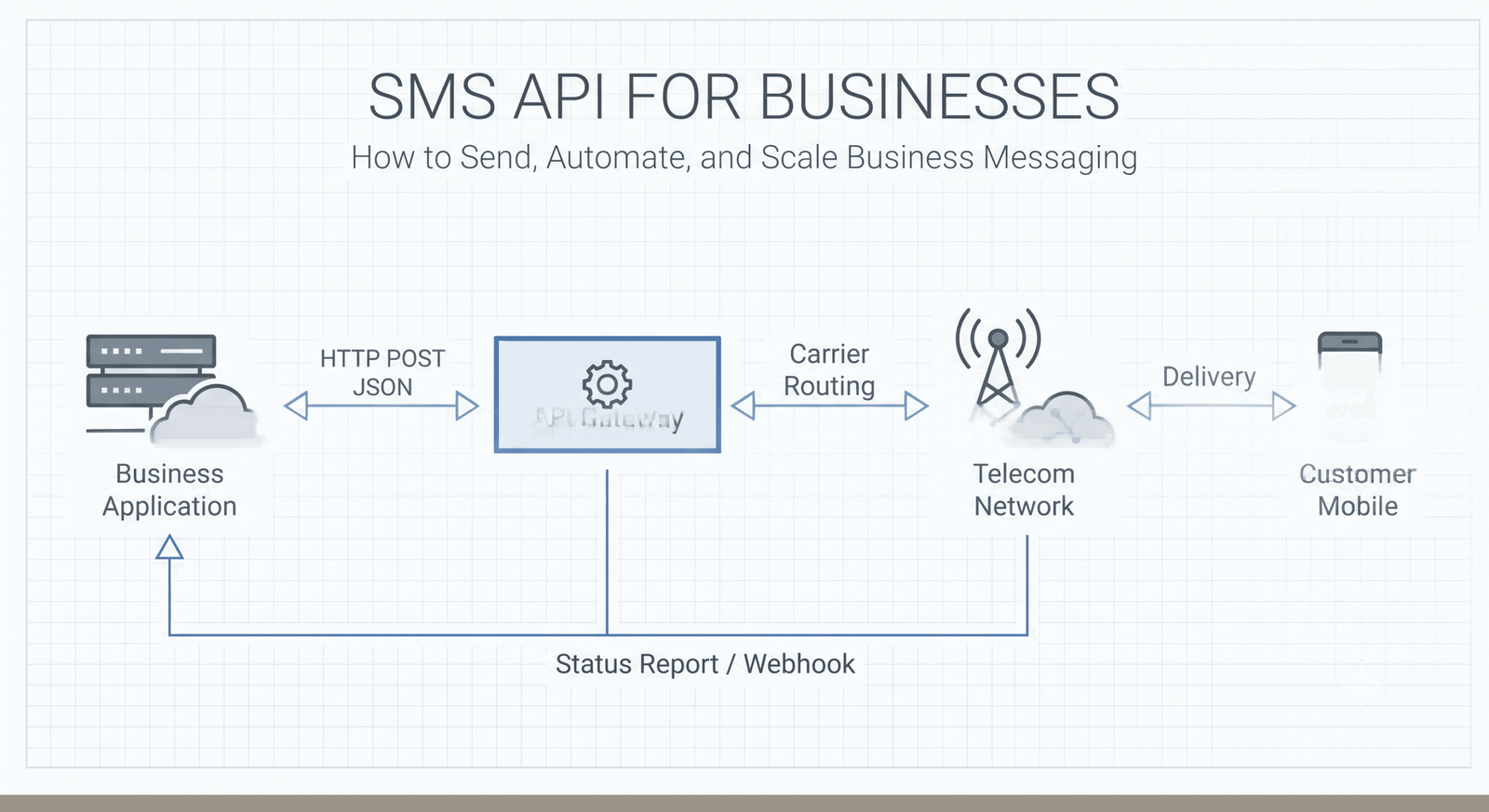
Businesses still send millions of text messages every day.
OTP codes, order confirmations, appointment reminders, payment alerts, delivery updates, login notifications and customer communications all have something in common: they need to reach the customer quickly, reliably and without someone manually pressing “send.”
That’s where an SMS API comes in.
An SMS API allows a business application to communicate with an SMS gateway programmatically. Instead of sending messages manually from a phone or dashboard, your software can trigger an SMS automatically whenever a particular event occurs.
A customer creates an account? Send a verification code.
An order ships? Send an update.
A payment fails? Send an alert.
An appointment is tomorrow? Send a reminder.
The API becomes the connection between the business system and the mobile network.
For businesses looking to automate communication at scale, understanding how an SMS API works—and what to look for in an SMS API provider—is increasingly important.
Table of Contents
What Is an SMS API?
An SMS API (Application Programming Interface) is a software interface that allows an application to send and manage SMS messages programmatically.
In simple terms, it lets your software tell an SMS platform:
“Send this message to this phone number.”
The SMS platform then handles the communication infrastructure required to deliver that message through the appropriate telecom network.
A typical workflow looks like this:
Business application → SMS API → SMS gateway → Mobile network → Customer’s phone
The business application could be almost anything:
- An ecommerce platform
- Banking or fintech software
- A CRM
- A healthcare application
- A logistics platform
- A SaaS product
- A booking system
- An enterprise application
- A customer-support platform
The important part is that the SMS doesn’t have to be sent manually.
The application triggers it automatically.
How an SMS API Works
Although the underlying telecom infrastructure can be complicated, the developer experience is usually straightforward.
A business application sends an API request containing information such as:
- Recipient phone number
- Sender ID or originating number
- Message content
- Authentication credentials
- Optional delivery or routing parameters
The SMS API processes the request and passes it to the messaging infrastructure.
A simplified architecture looks like this:
Customer action
      ↓
Business application
      ↓
Application server
      ↓
SMS API
      ↓
SMS gateway / carrier network
      ↓
Customer's mobile phone
      ↓
Delivery status
      ↓
Webhook / application
The final step is important.
Modern business messaging isn’t just about sending a message. Businesses also need to know whether the message was accepted, delivered, rejected or failed.
That’s why delivery reporting and webhooks are important parts of a serious SMS API integration.
SMS API vs Traditional SMS Sending
Traditional SMS sending usually involves a person composing and sending messages manually from a phone or messaging interface.
That works for personal communication.
It doesn’t work particularly well when a company needs to send thousands or millions of messages based on events happening inside its software.
Consider an online store.
If 10,000 orders are placed during a day, manually sending 10,000 order confirmations isn’t realistic.
With an SMS API, the workflow can be automated:
Order placed → Payment confirmed → SMS triggered → Customer receives confirmation
No manual intervention is required.
This is the fundamental difference.
| Traditional SMS | SMS API |
|---|---|
| Manually sent | Programmatically triggered |
| Difficult to scale | Designed for scale |
| Limited automation | Highly automatable |
| Little system integration | Integrates with business software |
| Manual tracking | Delivery reports and analytics |
| Suitable for individual communication | Suitable for business workflows |
For organizations running automated customer journeys, the API approach is considerably more flexible.
Why Businesses Use SMS APIs
SMS remains useful because it doesn’t require customers to install a particular app.
A customer may not have your mobile application.
They may not use WhatsApp.
They may not have an account on your website.
But if they have a mobile number, SMS can often provide a direct communication channel.
That makes SMS particularly useful for time-sensitive messages.
1. OTP and Authentication
One of the most common SMS API use cases is sending one-time passwords.
For example:
User enters phone number → Application generates OTP → SMS API sends code → User enters OTP → Account is verified
This can be used for:
- Account registration
- Login verification
- Password recovery
- Transaction authentication
- Phone-number verification
- Multi-factor authentication
For authentication workflows, reliability and delivery speed are usually more important than elaborate message formatting.
2. Transactional SMS
Transactional SMS is triggered by a specific action or event.
Examples include:
- Order confirmation
- Payment confirmation
- Shipping notification
- Delivery update
- Booking confirmation
- Appointment reminder
- Account notification
- Subscription update
These messages are generally part of the customer’s expected interaction with a business.
A good transactional messaging system should be tightly integrated with the application generating the event.
3. Alerts and Notifications
SMS APIs can also be used for operational alerts.
For example:
- Server outage notifications
- Security alerts
- Fraud warnings
- System status updates
- Critical business notifications
- Emergency communications
The advantage is automation.
A monitoring system can trigger an SMS without waiting for an employee to notice the problem and send an alert manually.
4. Marketing and Promotional Messaging
Businesses can also use SMS APIs for promotional communication, including:
- Sales
- Product launches
- Special offers
- Customer campaigns
- Event promotions
- Personalized marketing
However, promotional messaging requires considerably more attention to consent, opt-outs, sender identity, frequency and applicable regulations.
A technically capable SMS API doesn’t make an unsolicited campaign compliant.
The messaging strategy and consent model matter just as much as the API.
SMS API for Bulk Messaging
One of the biggest reasons businesses adopt SMS APIs is the ability to send messages at scale.
Suppose a company needs to notify 100,000 customers about a service update.
A basic SMS integration should be able to accept the required messages efficiently rather than forcing the business to send every message individually through a dashboard.
A scalable SMS API should therefore be evaluated on factors such as:
- Throughput
- Rate limits
- Queue management
- Delivery speed
- Carrier connectivity
- Retry handling
- Delivery reporting
- API reliability
- Geographic coverage
But “bulk SMS” shouldn’t automatically mean “send everything at once.”
Good infrastructure manages traffic intelligently.
For example:
Application → Message queue → SMS API → Carrier routing → Delivery tracking
This approach helps prevent traffic spikes from overwhelming the application or messaging system.
SMS API for Notifications
Notifications are one of the simplest and most effective ways to connect an application to SMS.
Imagine a logistics company.
A shipment changes status:
Shipment picked up
The application updates the shipment record.
↓
An event is generated.
↓
The SMS API receives the message request.
↓
The customer receives:
Your shipment has been picked up and is now in transit.
The customer doesn’t need to open an application just to discover that information.
That’s the value of event-driven SMS.
SMS API Integration With Business Software
An SMS API becomes much more valuable when it isn’t operating as an isolated tool.
Businesses can integrate SMS with:
- CRMs
- ERP systems
- Ecommerce platforms
- Payment systems
- Customer-support platforms
- Booking systems
- Marketing automation platforms
- Internal dashboards
- Custom applications
For example, a CRM could trigger an SMS after a sales representative updates a lead.
An ecommerce system could trigger a message when an order changes status.
A healthcare platform could trigger appointment reminders.
The SMS API becomes part of the larger business workflow rather than simply another messaging tool.
REST APIs and SMS
Most modern SMS APIs are designed to work with standard web technologies.
A REST-style API commonly uses HTTP requests to perform operations such as sending a message or retrieving information about a message.
A simplified request might look conceptually like:
POST /messages
with information such as:
{
  "to": "+919999999999",
  "message": "Your order has been shipped."
}
The exact endpoint, authentication method and request structure depend on the provider.
Developers should therefore evaluate the API documentation before choosing a provider.
Good documentation should make it easy to understand:
- Authentication
- Endpoints
- Request parameters
- Response formats
- Error codes
- Rate limits
- Webhooks
- Delivery reports
- SDKs
- Code examples
The easier the API is to integrate, the lower the engineering cost of adopting it.
SMS API Authentication and Security
An SMS API has access to a communication channel that can affect customers directly.
That means API credentials need to be treated as sensitive infrastructure.
Businesses should use appropriate authentication and security practices, including:
- Secure API credentials
- HTTPS
- Server-side credential storage
- Access controls
- Credential rotation
- Rate limiting
- Monitoring
- Logging
- Abuse detection
API keys should not be embedded directly into publicly accessible frontend code.
A compromised SMS API credential can result in unauthorized message sending, unexpected costs and reputational damage.
For that reason, security should be considered during the integration—not added as an afterthought.
Delivery Reports and SMS Webhooks
Sending an SMS is only half the workflow.
A business may also need to know what happened afterward.
Was the message delivered?
Did the carrier reject it?
Was the number invalid?
Did the message expire?
This is where delivery reports and webhooks become important.
A webhook allows the SMS platform to notify your application when a particular event occurs.
The flow can look like this:
SMS sent → Carrier processes message → Delivery status generated → Webhook sent → Business system updated
This information can be used to:
- Update customer records
- Trigger another workflow
- Retry appropriate failures
- Monitor delivery rates
- Detect problems
- Measure campaign performance
For critical notifications, this visibility is extremely valuable.
What to Look for in an SMS API Provider
Choosing an SMS API provider shouldn’t come down to the cheapest price per message.
The cheapest API can become expensive if delivery is unreliable or engineering teams spend weeks working around poor documentation.
Here are the factors worth evaluating.
API Documentation
Can a developer understand the API without repeatedly contacting support?
Look for:
- Clear documentation
- Authentication examples
- Code samples
- Error documentation
- Webhook documentation
- SDK support
Delivery Reliability
An SMS provider should have reliable carrier connectivity and monitoring.
Ask how delivery is tracked and how failed messages are handled.
For critical use cases such as OTPs, reliability is especially important.
Scalability
Your requirements today may be very different from your requirements next year.
A provider should be able to support increasing message volumes without forcing you to redesign the entire integration.
Geographic Coverage
If you’re sending messages across multiple countries, check the provider’s carrier coverage and local messaging requirements.
International SMS isn’t simply one global network.
Routing, sender IDs, regulations and carrier policies can vary considerably by country.
Delivery Reporting
Look for detailed delivery statuses rather than a simple “sent” confirmation.
The distinction between:
API accepted
and
Customer received
is important.
Webhooks
Webhooks allow your application to react to messaging events automatically.
They are particularly useful for:
- Delivery status
- Failed messages
- Replies
- Event-driven workflows
Support for Multiple Use Cases
A business may initially need OTP messages and later add notifications, alerts or promotional campaigns.
Choosing infrastructure that supports the broader messaging strategy can reduce future migration work.
SMS API Pricing: What Actually Determines Cost?
SMS API pricing can look simple at first:
Price per SMS × Number of messages
In practice, costs can be affected by several variables.
These may include:
- Destination country
- Carrier
- Message length
- Number of SMS segments
- Sender type
- Message category
- Volume
- Promotional vs transactional traffic
- Additional platform features
Message length is particularly important.
A message that looks like one message to a user may technically be split into multiple SMS segments depending on its encoding and length.
That means businesses should calculate cost per delivered communication, not just the advertised cost per SMS.
SMS API and Message Length
SMS has technical limitations that developers should understand.
A standard SMS can contain a limited number of characters. Longer messages may be divided into multiple segments.
Character encoding can also affect how much text fits into a single message.
For example, using certain Unicode characters can reduce the number of characters available per segment.
This matters because:
Longer message → Multiple segments → Higher message count → Higher cost
For automated systems, message templates should therefore be designed with SMS constraints in mind.
Shorter isn’t just cheaper.
It is often easier to read.
SMS API, Compliance and Consent
Messaging infrastructure and messaging compliance are two different things.
An API can technically send a message.
That doesn’t necessarily mean the business should send it.
Organizations need to consider applicable rules around:
- Customer consent
- Promotional messaging
- Opt-outs
- Sender identification
- Frequency
- Data protection
- Local telecom regulations
Requirements vary by market.
For businesses operating in India, messaging workflows also need to account for India’s telecom and commercial communication framework, including applicable DLT requirements for business messaging.
Compliance should therefore be designed into the messaging architecture from the beginning.
SMS API vs WhatsApp API
SMS and WhatsApp serve different communication needs.
SMS has a major advantage:
The customer doesn’t need a WhatsApp account or your application to receive a text.
WhatsApp, on the other hand, can provide richer conversational experiences and media capabilities.
A simplified comparison looks like this:
| Capability | SMS API | WhatsApp API |
|---|---|---|
| Phone number required | Yes | Yes |
| Dedicated app required | No | Yes |
| Rich media | Limited | Strong |
| Authentication/OTP | Strong use case | Possible depending on setup |
| Transactional alerts | Strong | Strong |
| Conversational experience | Limited | Strong |
| Global availability | Broad | Broad but account/app dependent |
| Best for | Reach and direct alerts | Rich conversations and engagement |
For many businesses, the answer isn’t SMS or WhatsApp.
It is choosing the right channel for the right customer interaction.
SMS API vs Email
Email is excellent for detailed information.
SMS is better suited to short, time-sensitive communication.
Consider the difference between:
Your monthly account statement is attached…
and:
SMS
Your payment was received successfully.
The channels can complement each other.
A business might use email for detailed information and SMS for the immediate notification that something happened.
Building an SMS Automation Workflow
A mature SMS system usually starts with an event.
For example:
Customer places order
↓
Application records order
↓
Order event triggers messaging workflow
↓
SMS template selected
↓
SMS API receives request
↓
Message routed to carrier
↓
Customer receives SMS
↓
Delivery event returned
↓
CRM/order system updated
This architecture can be expanded with:
- Message queues
- Retry logic
- Template management
- Personalization
- Analytics
- Delivery monitoring
- Rate limiting
- Fallback channels
At that point, SMS is no longer a standalone feature.
It becomes part of the company’s communication infrastructure.
Best Practices for SMS API Integration
A reliable integration should be designed for real-world conditions, not just the successful demo.
Use Templates
Standardize recurring messages rather than generating every message from scratch.
Templates improve consistency and make compliance easier to manage.
Validate Phone Numbers
Bad numbers create unnecessary failures and wasted messaging costs.
Handle API Errors
Your application should know what to do when an API request fails.
Use Idempotency Where Appropriate
A retry should not accidentally send the same critical message multiple times.
Monitor Delivery
Track delivery rates rather than assuming every accepted API request reached a customer.
Protect Credentials
Keep API credentials on secure backend infrastructure.
Respect Customer Preferences
Don’t treat the ability to send a message as permission to send one.
Design for Failure
Carriers fail.
Networks fail.
APIs fail.
Applications fail.
Your messaging system should have appropriate retry, logging and fallback mechanisms.
SMS API for Developers: Start With the Use Case
Developers sometimes begin an SMS integration by looking for the API documentation first.
It’s usually better to begin with the communication workflow.
Define:
What event triggers the message?
Then:
Who receives it?
Then:
What should the message say?
Then:
What happens if delivery fails?
Then:
What data needs to return to the application?
Only after those questions are clear should you design the API integration.
This prevents a common mistake: building an SMS sending function without designing the larger communication workflow around it.
SMS API for Businesses: Think Beyond Sending
The basic function of an SMS API is easy to understand:
Send a text message.
The real business value is much bigger.
An effective SMS infrastructure can connect customer actions, business systems and communication events into a single automated workflow.
A customer makes a payment.
Your system knows about it.
The SMS API communicates it.
The customer receives the update.
The delivery status returns to your system.
Everything happens automatically.
That’s the real reason businesses use SMS APIs.
The Future of Business SMS
Business messaging is moving toward more automated, event-driven and multi-channel communication.
SMS remains particularly valuable for messages where reach and immediacy matter.
At the same time, businesses are increasingly combining SMS with other channels such as email, WhatsApp, RCS and push notifications.
The result isn’t necessarily one channel replacing another.
Instead, communication systems are becoming smarter about selecting the appropriate channel for each customer interaction.
For example:
Marketing campaign → Rich messaging
Order confirmation → SMS
Detailed invoice → Email
Conversational support → WhatsApp
App engagement → Push notification
The SMS API can sit inside that larger communication architecture and handle the situations where SMS is the most appropriate channel.
Choosing the Right SMS API Strategy
Before implementing an SMS API, define what you’re actually trying to accomplish.
If you need OTPs, prioritize speed, reliability and delivery.
If you need transactional notifications, prioritize automation and integration.
If you’re sending high-volume campaigns, focus on throughput, compliance, analytics and cost.
If you’re building a multi-channel communication platform, look for infrastructure that can fit into a broader messaging architecture.
There is no single “best SMS API” for every business.
The right solution is the one that fits your use case, technical architecture, geographic requirements, messaging volume and compliance needs.
Final Thoughts
An SMS API turns text messaging from a manual activity into an automated part of your software.
That’s what makes it so useful for modern businesses.
Instead of asking employees to send individual messages, applications can trigger communication automatically based on customer actions and business events.
Whether you’re sending OTPs, payment notifications, order updates, appointment reminders, alerts or large-scale business messages, the underlying principle is the same:
Your software detects an event, and your messaging infrastructure communicates it.
The important decision isn’t simply which SMS API can send a message.
It’s which platform can reliably support the entire communication workflow—from API request and routing to delivery tracking, compliance, analytics and scale.
For businesses building automated customer communication, that’s where an SMS API becomes infrastructure rather than just another software integration.
Get real time update about this category directly on your device, subscribe now.
Have any thoughts?
Share your reaction or leave a quick response — we’d love to hear what you think!
-
 0
0 - 0
- 0
- 0
- 0
- 0