Barsha Chowdhury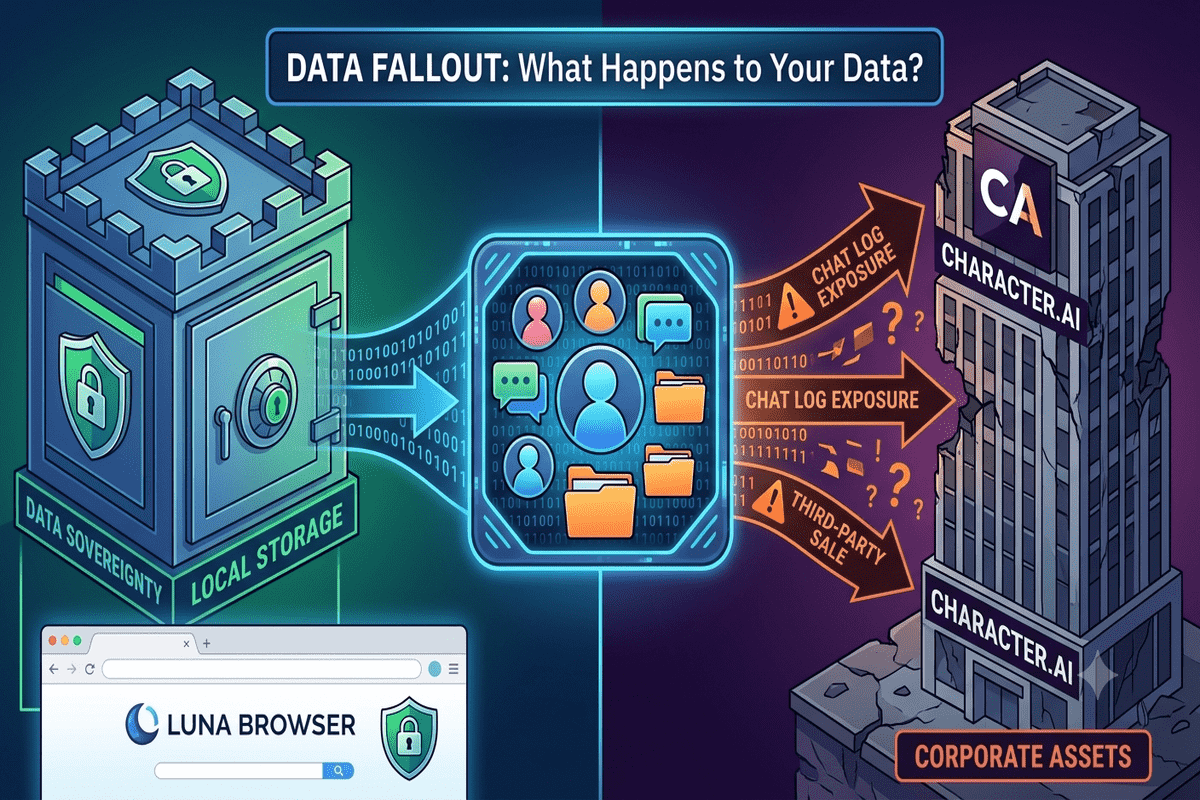
Are you worried about where your private chat logs and personal data will end up following recent corporate liquidations? When popular platforms face insolvency, thousands of users panic about their digital footprint. Choosing a free open-source browser gives you total ownership over your local data and browsing privacy.
This comprehensive guide covers everything you need to know about corporate bankruptcy data transfers, how to export or permanently delete your stored logs, and why transitioning to a secure, community-driven open-source browser protects your sensitive digital identity moving forward.
Table of Contents
The Truth About Corporate Bankruptcy and User Data Privacy
When an online platform or companion app files for Chapter 11 bankruptcy protection, its user databases, chat logs, and behavioral records are frequently treated as valuable corporate assets. While initial stalking-horse asset bids such as Disney’s $20 million IP purchase offer for Character.AI may explicitly exclude personal chat databases, sub-auction buyers in liquidations can still acquire full account registries.
As reported by Ars Technica, proprietary web services retain broad rights under standard terms of service, often allowing them to sell database assets during corporate mergers or court-ordered liquidations. Under U.S. bankruptcy law, a court-appointed consumer privacy ombudsman may review transactions, but existing privacy policy loopholes often leave sensitive user data vulnerable to the highest bidder.
Step-by-Step: How to Secure and Delete Your Account Data
If you currently use cloud-hosted companion apps, you should act immediately to export or delete your personal logs before court proceedings finalize asset transfers.
1. Requesting a Complete Data Export
Most platforms offer account exports within their settings, though processing times can take three to four weeks during high-volume liquidation periods:
- Open your Profile Settings on the web or mobile app.
- Select Account or Legal & Privacy.
- Click Export Data to request a download link sent directly to your registered email address.
Important Note: Always complete and verify your data export before initiating account deletion, as terminating your profile revokes your access to pending download files.
2. Permanently Deleting Your Profile
Once you have saved your local archives, permanently wipe your remote server presence:
- Navigate to Account Settings and choose Delete Account or Remove Account.
- Confirm account removal (this process is irreversible).
- Manually cancel active app-store subscriptions via Google Play or the Apple App Store to prevent unexpected recurring charges.
Why Switching to an Open-Source Browser Protects Your Privacy
Centralized cloud applications and proprietary platforms constantly track user interactions, storing sensitive information on external servers that can be monetized or auctioned during insolvency. Shifting your online activities to a trusted privacy-focused browser eliminates this risk by keeping data encrypted and stored locally on your device.
Key Benefits of Privacy-Centric Web Browsing
- Zero-Knowledge Architecture: A true privacy browser prevents third-party telemetry, ensuring remote entities cannot build behavioral profiles on you.
- Independent Code Audits: Transparent source code allows global security researchers to verify that no hidden backdoors or tracking scripts exist.
- Complete Data Ownership: Using a secure web browser keeps your cache, cookies, and chat sessions under your direct control rather than on vulnerable corporate servers.
- Lightweight Performance: A customized lightweight browser reduces RAM overhead while actively blocking invasive scripts, delivering a significantly faster web experience.
Top Open-Source Browser Alternatives to Consider
If you want to escape proprietary telemetry and secure your personal web footprint, switching to a modern Chrome alternative or Firefox alternative is your best long-term solution.
| Browser Name | Primary Focus | Transparency | Key Strengths |
| Brave | Privacy & Speed | 100% Open-Source | Built-in ad shield, native tracker blocking, Chromium compatibility |
| LibreWolf | Hardened Security | 100% Open-Source | Custom Firefox build, zero telemetry, enforced anti-fingerprinting |
| Waterfox | Customization | 100% Open-Source | Independent open-source Firefox alternative, robust legacy extension support |
| Chromium | Native Base | 100% Open-Source | Core open-source Chrome alternative engine without Google telemetry |
Pros and Cons of Open-Source Software
Pros:
- Full source-code transparency audited by independent global security developers.
- Advanced protection against tracking, canvas fingerprinting, and unauthorized cross-site cookies.
- Complete control over automated update schedules and telemetry settings.
Cons:
- Some specialized enterprise web applications may require manual feature overrides.
- Requires minor initial configuration to optimize strict security settings.
Actionable Tips to Secure Your Digital Footprint Today
- Deploy Local-First Tools: Migrate away from centralized, proprietary web services in favor of self-hosted or local-first tools running inside a fast open-source browser.
- Audit Account Permissions: Regularly review connected third-party platforms, revoking permissions for inactive web services.
- Use Sandboxed Profiles: Set up isolated browsing profiles inside your best open-source browser to keep work, personal, and search activities completely separate.
- Enforce Strict Anti-Tracking: Turn on native fingerprint protection in your modern web browser to stop aggressive advertising scripts from profiling your hardware setup.
Conclusion
Corporate liquidations serve as a stark reminder that trusting proprietary platforms with your sensitive personal conversations carries inherent privacy risks. When platforms go under, user databases often become bargaining chips in bankruptcy courts. Taking back control of your digital identity starts at the gateway to the internet: your browser. By adopting a transparent, community-verified open-source browser, you protect your data from unexpected server liquidations and unauthorized third-party tracking.
Ready to reclaim your digital sovereignty? Switch to a trusted best browser for privacy today and secure your web footprint against future corporate fallouts!
Frequently Asked Questions
Can a bankrupt company sell my private chat history to a new owner?
Yes, depending on the terms of the acquisition court ruling. While initial stalking-horse bids may exclude user data, unencrypted cloud databases can be acquired by purchasing entities unless protected by strict regulatory intervention.
How long does it take to process a full account data export?
Processing times vary by platform demand, often taking anywhere from a few days to three or four weeks during platform shutdowns. It is crucial to initiate your data request as early as possible.
Why is an open-source browser safer than a proprietary browser?
An open-source browser exposes its underlying source code for global public auditing, ensuring developers cannot secretly collect, monetize, or store your personal browsing telemetry on corporate servers.
Get real time update about this category directly on your device, subscribe now.
Have any thoughts?
Share your reaction or leave a quick response — we’d love to hear what you think!
-
 0
0 - 0
- 0
- 0
- 0
- 0