Suddham Sen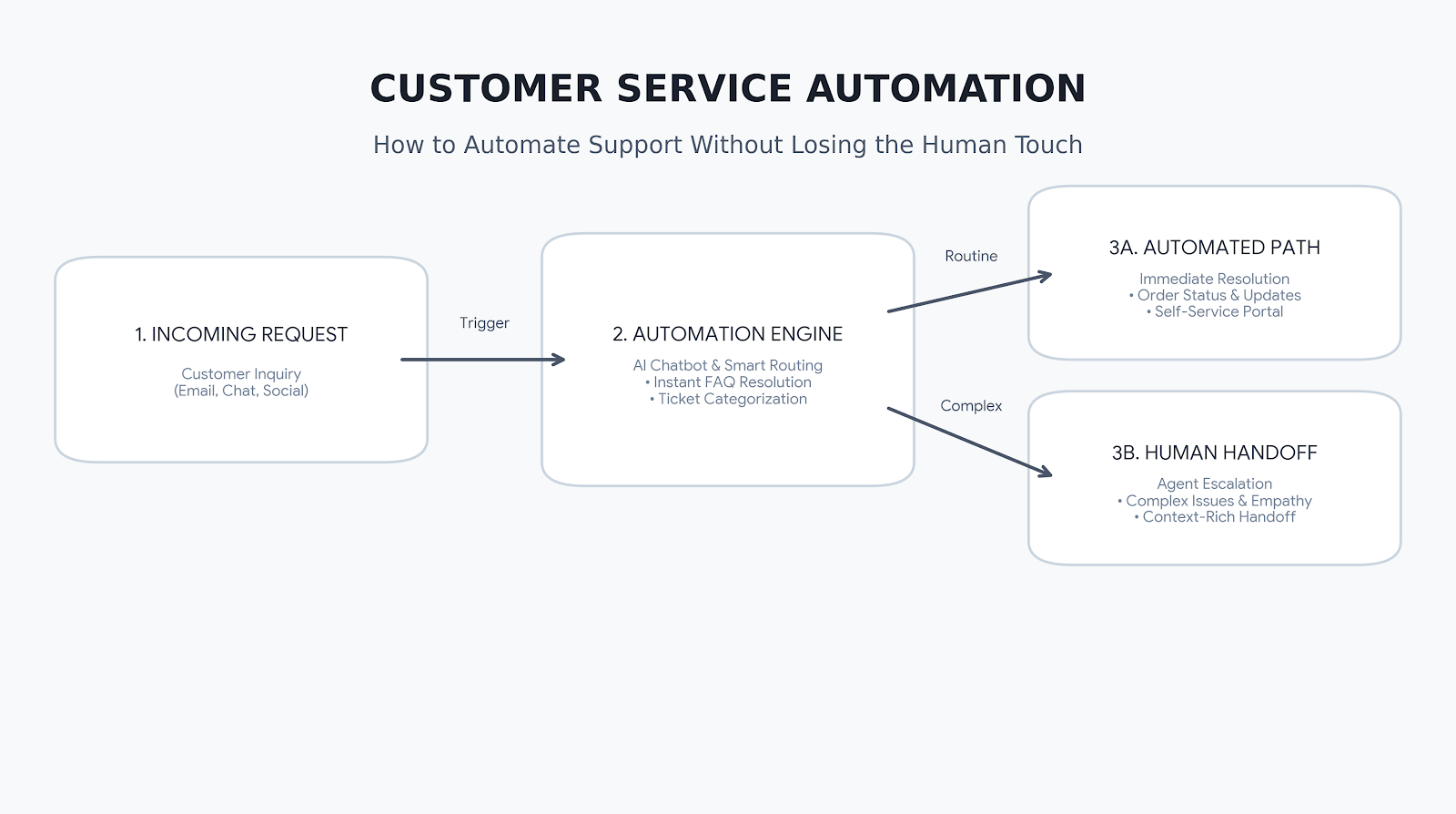
Customer expectations are changing. People want quick answers, convenient support, and consistent service across email, websites, messaging apps, and social media. For businesses handling hundreds or thousands of customer interactions, meeting these expectations manually can become difficult and expensive.
This is where customer service automation comes in. By using AI chatbots, automated workflows, self-service tools, and customer support software, businesses can resolve routine queries faster while allowing human agents to focus on conversations that need personal attention.
However, successful automation is not about removing people from customer service. It is about making support more efficient without making customers feel ignored. This guide explores how customer service automation works, its benefits, the tools businesses can use, and how to maintain a human touch throughout the customer experience.
Table of Contents
What Is Customer Service Automation?
Customer service automation is the use of software and technology to handle repetitive support tasks with minimal manual intervention. These tasks may include answering common questions, routing support tickets, sending order updates, collecting customer information, and following up on unresolved issues.
Traditional automation follows predefined rules, such as assigning a ticket to a specific department based on its category. AI-powered customer service automation can go further by interpreting natural-language questions, identifying customer intent, summarizing conversations, and helping agents find relevant information.
For example, an online store can automatically answer questions about delivery times, share order-status updates, and route refund requests to the appropriate team. A human agent can then handle complicated complaints or exceptions.
The goal is to create a support process that is faster and more consistent while preserving human judgment where it matters.
How Does Customer Support Automation Work?
Customer support automation combines several technologies and workflows to manage customer interactions.
1. Automated responses: Businesses can use chatbots, email templates, and messaging workflows to answer frequently asked questions about products, services, billing, delivery, and account access.
2. Ticket routing and prioritization: Customer service software can categorize incoming requests and assign them to the right team. Rules may use keywords, issue types, customer details, or urgency to determine the next step.
3. AI-powered chatbots: AI chatbots can interpret customer questions and provide answers based on approved information. Depending on their configuration, they may also collect details, guide customers through troubleshooting, or transfer conversations to human agents.
4. Workflow automation: Automated workflows can send confirmations, trigger follow-up messages, update ticket statuses, and notify teams when a request needs attention.
5. Agent assistance: Some platforms help human representatives by summarizing conversations, suggesting responses, retrieving relevant knowledge-base articles, and reducing repetitive administrative work.
These capabilities can work together. A chatbot might collect information from a customer, create a support ticket, route it to the appropriate department, and provide the agent with a summary before the conversation begins.
Key Benefits of Customer Service Automation
Faster Response Times
Customers do not always want to wait for a support representative to answer a basic question. Automated customer support can provide immediate responses to common queries and acknowledge requests outside regular business hours.
This is particularly useful for businesses that receive high volumes of repetitive questions.
Lower Support Workload
Customer service automation can reduce the time agents spend on repetitive activities such as ticket categorization, status updates, and answering frequently asked questions. This allows support teams to spend more time resolving complex issues and assisting customers who need individual attention.
Automation does not eliminate every support cost, however. Software subscriptions, integration, maintenance, monitoring, and employee training should be included when evaluating its financial impact.
More Consistent Customer Experiences
Automated workflows help standardize how common questions are answered and how support requests are processed. When responses draw on accurate, regularly maintained information, customers are more likely to receive consistent guidance across support channels.
Businesses still need to review automated answers and update them when policies, pricing, or product information changes.
Support Beyond Business Hours
A well-configured chatbot or self-service portal can help customers find information when live agents are unavailable. It can answer supported questions, collect details for a follow-up, and explain when a human representative will respond.
This provides broader support coverage without requiring a staffed team to be available at every hour.
Better Visibility Into Customer Issues
Customer service automation tools can organize support interactions and help teams identify recurring problems. Reports on ticket volume, response times, resolution times, and common complaint categories can reveal where customers are struggling.
These insights can inform improvements to product documentation, website content, onboarding, and customer service processes.
Common Customer Service Automation Use Cases
The best use cases usually involve tasks that are repetitive, predictable, and relatively easy to verify.
AI Chatbots for Frequently Asked Questions
AI chatbots can answer common questions about account setup, business hours, return policies, product features, and service availability. They should rely on trustworthy business information and clearly indicate when a question needs human assistance.
Automated Ticket Management
Support ticket automation can classify requests, assign them to the right team, flag priority cases, and send status notifications. This helps prevent requests from being overlooked and reduces manual administration.
Order and Delivery Updates
Ecommerce businesses can automate order confirmations, shipping notifications, delivery updates, and basic order-status queries. Customers can receive useful information without contacting an agent for every update.
Appointment Scheduling and Reminders
Service providers can automate booking confirmations, appointment reminders, rescheduling instructions, and follow-up messages. These workflows can reduce repetitive communication and make scheduling more convenient.
Customer Onboarding and Troubleshooting
Businesses can guide new customers through setup steps, share help articles, and provide troubleshooting instructions. If automated guidance does not resolve the issue, the system should offer an easy way to contact a person.
Feedback Collection
Automated surveys can collect customer feedback after a support interaction or purchase. Teams can use the results to identify recurring service problems, provided that surveys are appropriately timed and do not overwhelm customers.
Choosing the Right Customer Service Automation Software
Choosing customer service automation software requires more than comparing feature lists. The right platform should fit the business’s support processes, communication channels, technical environment, and budget.
Consider these factors before making a decision:
Integration capabilities: Check whether the platform connects with your existing CRM, ecommerce system, help desk, website, and messaging channels. Poor integration can create duplicate work and fragmented customer records.
AI and chatbot capabilities: Determine whether the software supports rule-based automation, AI-powered conversations, knowledge-base integration, and reliable escalation to human agents.
Omnichannel support: If customers contact your business through email, live chat, social media, or messaging apps, look for a solution that helps agents manage those interactions consistently.
Reporting and analytics: Look for reports covering response times, resolution rates, ticket volume, customer satisfaction, and automation performance. The exact metrics available will vary by platform.
Security and privacy: Review access controls, data retention, privacy settings, and how the provider processes customer information. Sensitive actions should require appropriate verification and authorization.
Scalability and pricing: Understand how costs change with agent seats, conversation volume, AI usage, integrations, or additional features. A low starting price may not represent the total cost of operating the system.
For a small business, a basic help desk with automated ticket routing and a simple chatbot may be sufficient. A larger organization may need advanced integrations, more detailed analytics, multilingual support, and complex workflow management.
How to Automate Customer Service Without Losing the Human Touch
Automation works best when customers can still reach a knowledgeable person when they need one. Businesses should design the experience around customer needs rather than trying to automate every possible interaction.
Start With Repetitive, Low-Risk Tasks
Identify questions that customers ask frequently and that have clear, reliable answers. Automating delivery updates, business hours, appointment reminders, and basic account instructions is often a sensible starting point.
Avoid beginning with sensitive complaints or complicated decisions that require context and judgment.
Make Human Escalation Easy
Customers should not have to repeat themselves endlessly to escape a chatbot. Provide a clear path to a human representative when the issue is complex, the customer requests assistance, or the automated system cannot resolve the question.
Where possible, transfer the conversation history and information already collected so customers do not need to explain everything again.
Be Transparent About Automation
Do not design chatbots to mislead customers into believing they are speaking to a human. Clear expectations help build trust, particularly when a conversation moves from an automated assistant to a support representative.
Keep Answers Accurate and Relevant
AI systems can produce incorrect or outdated answers if their underlying information is incomplete or poorly maintained. Use approved knowledge sources, review common chatbot responses, and monitor conversations for errors.
For refunds, account changes, payments, and other sensitive actions, use suitable verification steps and explicit authorization.
Measure Quality, Not Just Speed
A fast response is not necessarily a good resolution. Track measures such as first-response time, resolution time, customer satisfaction, repeat contacts, escalation rates, and the percentage of requests resolved successfully.
If automation reduces response times but increases repeat complaints, the workflow needs improvement.
Common Mistakes to Avoid
One common mistake is automating a broken support process. If ticket ownership is unclear or internal information is outdated, adding software will not automatically fix the underlying problems.
Another is using chatbots for every interaction, even when customers need empathy or complex problem-solving. Automation should support human agents, not prevent customers from receiving appropriate help.
Businesses should also avoid launching workflows without testing them. Test common questions, unusual cases, failed integrations, escalation paths, and sensitive requests before deploying automation widely.
Finally, do not assume that higher automation rates automatically mean better customer service. The objective is to resolve customer problems effectively, not simply to maximize the number of conversations handled by software.
Final Thoughts
Customer service automation can help businesses respond faster, reduce repetitive work, improve consistency, and provide support outside normal business hours. AI chatbots, automated ticket routing, self-service tools, and workflow automation all have a role to play when they are implemented thoughtfully.
The most effective approach is to begin with predictable tasks, choose customer service automation software that fits existing processes, monitor performance, and make human assistance easy to access.
Ultimately, the goal of customer support automation is not to replace the human touch but to make it more valuable. When technology handles routine work and people focus on complex, sensitive, and relationship-driven conversations, businesses can build a support experience that is both efficient and genuinely helpful.
Get real time update about this category directly on your device, subscribe now.