Suddham Sen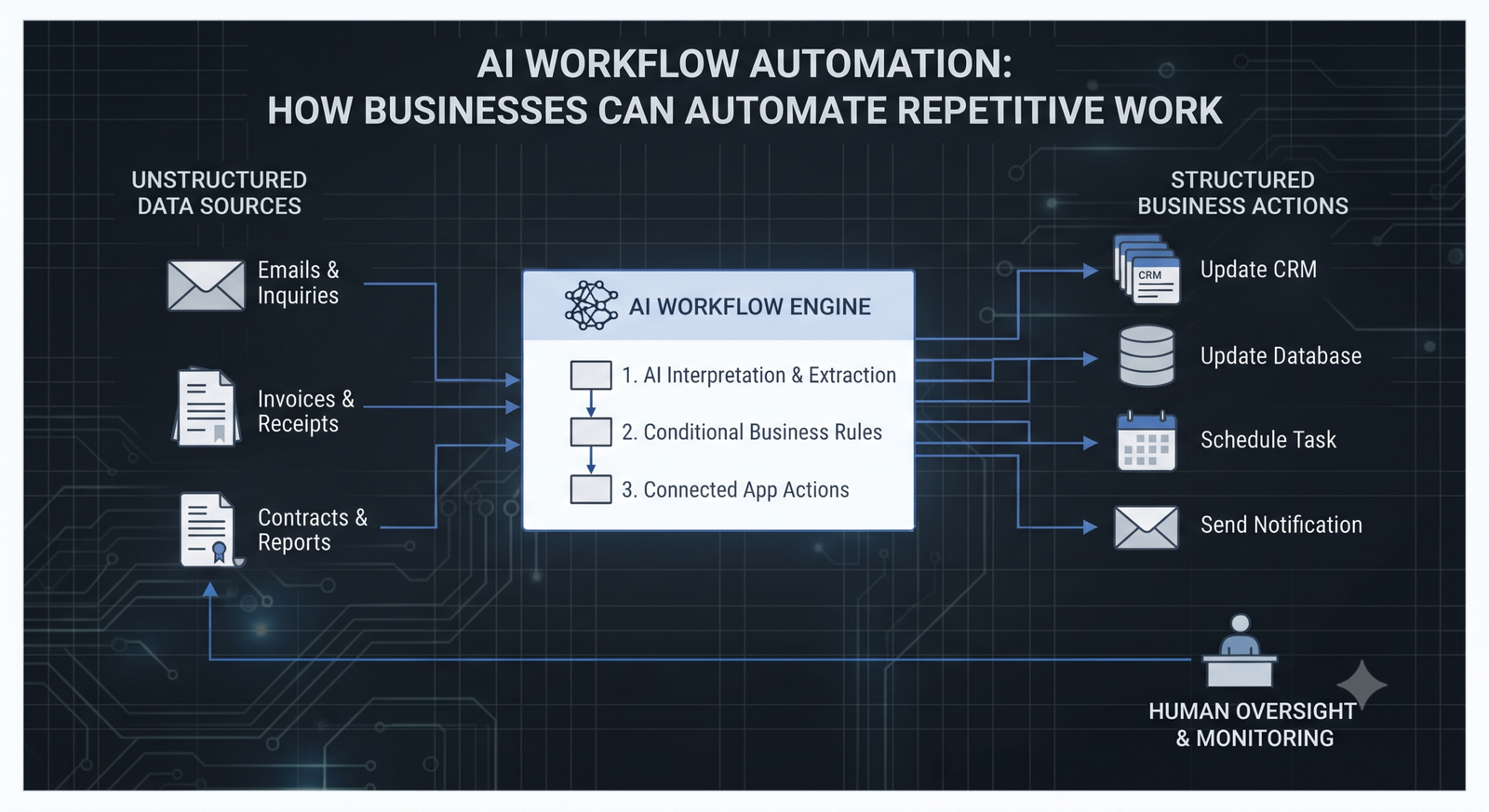
Businesses spend a surprising amount of time on repetitive tasks: updating spreadsheets, sorting emails, processing invoices, preparing reports, transferring data between applications, and following up with leads. Although these activities are necessary, they can slow down teams and leave less time for strategic work.
AI workflow automation helps businesses streamline these processes by combining artificial intelligence with automated workflows. Instead of relying entirely on manual input or rigid rules, AI-powered workflows can interpret information, categorize requests, summarize documents, and trigger actions across connected applications.
From small businesses looking to improve productivity to larger organizations managing complex operations, AI workflow automation offers practical ways to reduce manual work and improve consistency. The key is knowing which processes to automate, which tools to use, and where human oversight remains essential.
Table of Contents
What Is AI Workflow Automation?
AI workflow automation is the use of artificial intelligence and workflow automation technology to perform, coordinate, or improve a sequence of business tasks with less manual intervention.
Traditional workflow automation typically follows predefined rules. For example, when a customer submits a form, an automation can send a confirmation email and create a record in a customer relationship management (CRM) system.
AI workflow automation can add capabilities such as understanding natural-language requests, extracting information from documents, classifying incoming messages, generating summaries, and recommending the next action.
Consider a business that receives dozens of sales inquiries each day. An AI-powered workflow can analyze incoming messages, identify potential leads, extract relevant contact information, categorize inquiries by product interest, and route them to the appropriate sales representative.
The workflow still operates within defined business rules, but AI helps it handle information that may not follow a single predictable format.
Importantly, AI workflow automation is not the same as giving an AI tool unrestricted control over business operations. Effective implementations use clear permissions, validation rules, and human approval for sensitive or high-impact actions.
How Does AI Workflow Automation Work?
An automated AI workflow generally combines several components that work together to move a task from start to finish.
1. A Trigger Starts the Workflow
A trigger is the event that initiates an automated process. It might be a new email, a completed form, an uploaded document, a customer support ticket, or a scheduled task.
For example, a new invoice arriving in a designated email inbox can trigger an invoice-processing workflow.
2. AI Interprets the Information
The AI component processes the incoming information and performs a task such as extracting invoice details, summarizing a document, identifying a request type, or classifying a customer message.
The accuracy of this step depends on the quality of the input, the AI model, and the complexity of the task.
3. The Workflow Applies Business Rules
Once the information has been processed, predefined rules determine what happens next.
An invoice below a specified threshold might move to a routine review queue, while an invoice containing missing information or an unusual amount could be flagged for manual verification.
4. Connected Applications Perform Actions
Workflow automation software can pass validated information to connected applications. Depending on the available integrations, these actions may include creating CRM records, updating project management tasks, sending notifications, or preparing documents for approval.
5. The System Records and Monitors Results
Logs, status updates, and error notifications help teams understand whether a workflow completed successfully. Businesses should also monitor AI outputs, failed actions, and exceptions so problems can be identified before they affect customers or operations.
This combination of triggers, AI processing, business rules, integrations, and monitoring makes AI-powered workflow automation useful for processes involving multiple applications.
AI Workflow Automation vs. Traditional Automation
Traditional automation and AI workflow automation solve related but different problems.
Traditional automation is particularly effective when tasks follow predictable rules. For instance, a system can automatically send a payment reminder three days before a due date or assign a ticket based on its selected category.
AI workflow automation is more useful when a process involves unstructured information, language, classification, or variable inputs.
| Feature | Traditional Automation | AI Workflow Automation |
|---|---|---|
| Decision-making | Predefined rules | AI interpretation combined with rules |
| Input handling | Usually structured inputs | Can process text and other unstructured information |
| Common tasks | Scheduled emails, data transfers, fixed approvals | Document extraction, message classification, summarization |
| Predictability | Generally high for well-defined rules | Depends on input quality and AI reliability |
| Human oversight | Needed for exceptions and sensitive tasks | Important for uncertain outputs and high-impact decisions |
For many businesses, the best approach is to combine both. Traditional automation handles predictable actions, while AI processes information that would otherwise require manual interpretation.
Key Benefits of AI Workflow Automation for Businesses
Reduced Manual Work
One of the main benefits of AI workflow automation is reducing the time employees spend on repetitive administrative tasks. Information can be extracted, categorized, summarized, and transferred between systems without requiring someone to perform every step manually.
This can free employees to focus on analysis, customer relationships, problem-solving, and other work that benefits from human judgment.
Improved Operational Efficiency
Automated workflows help standardize how recurring tasks are completed. Once a process is configured and tested, it can follow the same sequence of actions whenever the relevant conditions are met.
This can reduce delays caused by manual handoffs, missing information, or inconsistent processes.
Fewer Manual Data-Entry Errors
Copying information between spreadsheets, forms, emails, and business applications creates opportunities for mistakes. AI-powered data extraction and workflow automation can reduce some of this manual effort.
However, AI outputs are not guaranteed to be correct. Validation rules and human review remain important, especially when handling financial records, customer details, or contractual information.
Faster Access to Business Information
AI can summarize lengthy documents, organize incoming requests, and extract key information from business records. When integrated into an appropriate workflow, these capabilities can help teams find and act on relevant information more quickly.
Better Scalability
As a business grows, the volume of invoices, customer inquiries, leads, and internal requests may increase. Automating suitable workflows can help teams handle additional volume without increasing manual effort at the same rate.
Actual savings depend on implementation costs, process complexity, exception rates, and ongoing maintenance.
Common AI Workflow Automation Use Cases
AI workflow automation can support a wide range of business processes. The most useful starting points are usually repetitive tasks with clear objectives and measurable outcomes.
1. Lead Management and Sales Automation
Sales teams can automate lead capture, contact enrichment where permitted, inquiry classification, CRM updates, and follow-up reminders.
For example, when a prospect submits a website form, a workflow can create a CRM record, summarize the prospect’s requirements, and notify the appropriate sales representative.
AI can help categorize free-text inquiries, while business rules control assignments and follow-up timing.
2. Invoice Processing and Finance Workflows
Invoice-processing workflows can extract supplier names, invoice numbers, dates, line items, and totals from documents. The system can then compare extracted information with purchase orders or existing records and flag discrepancies.
Payments and other consequential financial actions should follow appropriate approval and authorization procedures rather than relying solely on AI-generated results.
3. Customer Support Automation
Customer support teams can use AI workflow automation to classify incoming tickets, summarize conversation histories, suggest relevant knowledge-base articles, and route requests to the correct department.
This complements customer service automation by helping support teams manage the process behind each interaction. Human representatives should remain available for complex complaints, sensitive issues, and cases that require individual judgment.
4. Document Processing
Businesses often handle contracts, applications, reports, forms, and other documents containing useful information. AI can extract relevant fields, summarize content, and direct documents to the appropriate workflow.
Because document interpretation can be imperfect, extracted data should be validated before it is used for legal, financial, or other high-impact decisions.
5. Marketing Workflow Automation
Marketing teams can automate tasks such as organizing campaign data, summarizing performance reports, categorizing feedback, and preparing draft content for review.
AI can assist with content preparation and analysis, while marketers retain control over factual accuracy, brand voice, audience targeting, and final publication.
6. Internal Approvals and Project Management
AI-powered workflows can summarize project updates, identify missing information, create tasks from approved requests, and notify stakeholders when an action is required.
For example, a completed project request form could trigger task creation, assign a reviewer, and notify the relevant team. Human approval can remain part of the process wherever a decision requires accountability.
Popular AI Workflow Automation Tools
Choosing the right AI automation tools depends on the applications a business already uses, the complexity of its processes, its technical resources, and its security requirements.
Some commonly considered platforms include:
Microsoft Power Automate: Supports workflow automation across Microsoft products and connected services, with AI capabilities available through supported features and integrations.
Zapier: Connects applications and automates workflows using triggers and actions. Its available AI capabilities and integrations depend on the plan and specific workflow.
Make: Provides a visual environment for building workflows across connected applications, with support for conditional logic and integrations.
n8n: Offers a workflow automation platform with options for self-hosting and integrating AI services. It can suit teams that need greater control over workflow design and deployment.
UiPath: Focuses on enterprise automation, including robotic process automation and AI-enabled business processes.
These platforms are not interchangeable, and their features, pricing, integration limits, and AI capabilities can change. Before choosing one, test it against a real business process rather than selecting software based only on its feature list.
How to Implement AI Workflow Automation Step by Step
A successful implementation starts with a clear business problem, not with a tool.
Step 1: Identify repetitive tasks. Review daily operations and list processes involving repeated data entry, document handling, routine communication, or multiple manual handoffs.
Step 2: Select a suitable workflow. Start with a process that occurs frequently, has a clear outcome, and presents manageable risks. Avoid beginning with highly sensitive or complicated decisions.
Step 3: Map the current process. Document the trigger, required inputs, decision points, applications involved, approval steps, and expected output. This reveals unnecessary steps and integration requirements.
Step 4: Choose the right automation platform. Evaluate integrations, AI capabilities, access controls, monitoring, scalability, and total cost of ownership.
Step 5: Build and test the workflow. Test normal cases, missing data, unusual inputs, duplicate records, failed integrations, and incorrect AI outputs. Include a reliable process for handling exceptions.
Step 6: Introduce human review where necessary. Require appropriate approval for payments, sensitive customer actions, access changes, and other high-impact decisions.
Step 7: Measure performance and improve. Track completion rates, processing time, error rates, exception volume, and cost per completed task. Compare these results with the original process before expanding automation.
Common Mistakes to Avoid
One common mistake is automating an inefficient process without fixing its underlying problems. If responsibilities are unclear or business data is unreliable, automation may simply make those problems happen faster.
Another is using AI when a straightforward rule-based workflow would be cheaper, easier to test, and more predictable. Not every repetitive task needs an AI model.
Businesses should also avoid connecting AI systems to sensitive data or consequential actions without appropriate access restrictions. Review data-handling requirements, permissions, logging, and the security practices of third-party providers before deployment.
Finally, do not measure success only by the number of automated tasks. A workflow is valuable when it improves a meaningful business outcome without creating unacceptable risks or additional work elsewhere.
Best Practices for Successful AI Workflow Automation
For long-term results, keep workflows focused and easy to maintain. Assign clear ownership, document how each process works, and establish a plan for updating integrations and business rules.
Use reliable data sources and validate important AI-generated outputs. Apply least-privilege access so workflows can interact only with the systems and information they need.
Monitor failures and unusual results, and provide a clear route for employees to escalate problems. Review performance regularly as business processes and AI capabilities change.
Most importantly, keep employees involved in implementation. The people who perform a task every day often understand its exceptions and practical challenges better than anyone else. Their feedback can help create workflows that are genuinely useful rather than simply automated.
Final Thoughts
AI workflow automation gives businesses a practical way to reduce repetitive work, connect applications, and improve operational efficiency. From lead management and invoice processing to customer support and document handling, AI-powered workflows can help teams spend less time on routine administration and more time on meaningful work.
The strongest results come from choosing the right processes, combining AI with dependable business rules, selecting suitable workflow automation software, and measuring performance after deployment.
Businesses do not need to automate everything at once. Starting with one well-defined workflow, testing it carefully, and improving it over time is often the most sensible approach.
Get real time update about this category directly on your device, subscribe now.
Have any thoughts?
Share your reaction or leave a quick response — we’d love to hear what you think!
-
 0
0 - 0
- 0
- 0
- 0
- 0