Table of Contents
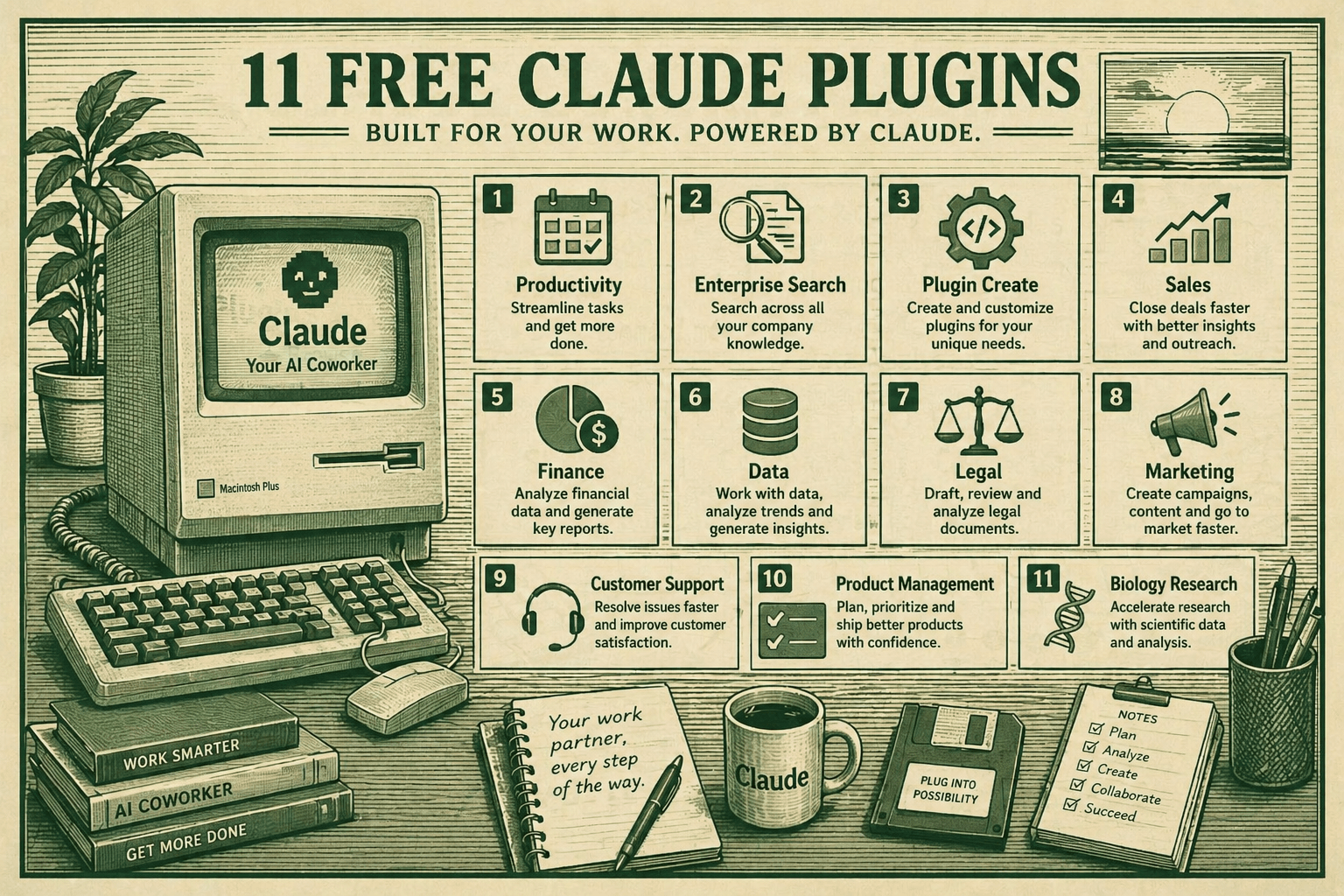
On January 30, 2026, Anthropic made a HUGE announcement: They released 11 free, open-source plugins for Claude Cowork. These aren’t just fancy add-ons – they’re complete work specialists that turn Claude into an expert in your specific job.
Think of it like this: Instead of hiring a generalist assistant, you now have experts for Sales, Legal, Finance, Marketing, and more – and they’re all completely free!
What Are Plugins, Actually?
Before we dive into the 11 plugins, let’s understand what a plugin is:
A plugin bundles skills, connectors, slash commands, and sub-agents for a specific job function, giving Claude a strong starting point for helping anyone in that role.
In simple words:
- Skills = Domain knowledge Claude automatically uses
- Slash Commands = Special actions you trigger (like
/sales:call-prep) - Connectors = Connections to your tools (Slack, Gmail, Asana, etc.)
- Sub-agents = Mini Claude experts working behind the scenes
Basically, plugins make Claude WAY smarter for specific jobs.
How These Plugins Will Actually Help You
These 11 plugins are game-changers for real work. Here’s exactly how they’ll help you:
Save Massive Amounts of Time: Instead of spending 2 hours writing a sales call prep document, run /sales:call-prep and get it in 2 minutes. Instead of manually triaging 50 support tickets, run /support:triage-tickets and Claude categorizes them all instantly. Your team will save hours every single day.
Make Better Decisions Faster: The Enterprise Search plugin searches across your entire company at once – emails, Slack, documents, everything. Ask “What are customers complaining about?” and get real answers with sources in seconds. No more hunting through systems. Finance teams get instant variance analysis. Legal teams get automatic risk flags. Marketing teams see campaign performance instantly.
Do Your Job Like an Expert: These plugins don’t just assist – they actually embed best practices into your workflow. The Sales plugin knows your sales process. The Legal plugin knows contract risk factors. The Product plugin knows roadmap planning methodology. You work faster AND smarter.
Never Lose Context Again: The Productivity plugin remembers your entire work context – your projects, tasks, who you talked to, what you decided. Claude brings context to every conversation. No more explaining the same thing twice.
Customize for Your Exact Workflow: All plugins are open source. You can modify them to match YOUR process, YOUR tools, YOUR terminology. The Sales plugin can learn your specific sales stages. The Legal plugin can learn your specific contract terms. The Finance plugin can use your actual chart of accounts.
Scale Your Team Without Hiring: One person with these plugins can do the work of 2-3 people. You get Sales expertise, Legal expertise, Finance expertise, Marketing expertise – all from one AI assistant working with your team. This is especially powerful for small companies and startups that can’t afford specialized staff.
Integrate With Everything You Already Use: These plugins connect to 38 tools – Slack, Gmail, Google Drive, Microsoft 365, Asana, Jira, Notion, Linear, and more. Claude becomes part of your existing workflow instead of being another tool you have to switch to.
The bottom line: These plugins turn Claude from a general-purpose chatbot into a specialized colleague who knows your job, knows your tools, and knows how to do things the way your company does them. That’s why this matters.
The 11 Free Claude Plugins (Complete Breakdown)
Here are all 11 plugins Anthropic is giving away. Pick the ones your team needs!
1. Productivity Plugin
What it does: Manages your tasks, calendars, daily workflows, and remembers your context
Perfect for: Anyone juggling multiple projects and tasks
Key Features:
- Manage tasks and to-do lists
- Connect to calendar apps (Google, Outlook, etc.)
- Track daily workflows
- Remember your work context so you don’t repeat yourself
Connects to: Slack, Notion, Asana, Linear, Jira, Monday, ClickUp, Microsoft 365
How to use:
/productivity:daily-briefing - Get your morning briefing
/productivity:task-summary - Summarize your pending tasks
/productivity:schedule-meeting - Claude helps schedule your meetings
2. Sales Plugin
What it does: Research prospects, prep you for deals, and keep you following your sales process
Perfect for: Sales teams, business development, account executives
Key Features:
- Research prospects automatically
- Prep for sales calls with AI briefing
- Follow your company’s sales process
- Track deal status and next steps
How to use:
/sales:call-prep - Get briefed before a sales call
/sales:prospect-research - Deep research on a prospect
/sales:deal-tracker - Track your current deals
/sales:email-drafter - Draft sales emails
Real example: Before a sales call, just run /sales:call-prep with the prospect’s name, and Claude researches them, finds common connections, and prepares talking points!
3. Marketing Plugin
What it does: Draft content, plan campaigns, and manage launches
Perfect for: Marketing teams, content creators, campaign managers
Key Features:
- Create and manage marketing campaigns, manage launches
- Draft blog posts, social media content, emails
- Plan multi-channel campaigns
- Analyze campaign performance
How to use:
/marketing:content-calendar - Create a content plan
/marketing:email-campaign - Draft email campaigns
/marketing:social-media - Generate social posts
/marketing:campaign-brief - Create a campaign brief
Real example: Need a month of social media posts? Just say “create Instagram posts for Q1” and Claude generates them all at once!
4. Finance Plugin
What it does: Analyze financials, build models, and track key metrics
Perfect for: CFOs, accountants, finance teams, startups
Key Features:
- Analyze financials, build models, and track key metrics
- Journal entries and reconciliation
- Financial statements
- Variance analysis
- Budget tracking
How to use:
/finance:monthly-report - Generate monthly financial report
/finance:variance-analysis - Analyze budget vs actual
/finance:financial-model - Build financial models
/finance:reconciliation - Help with account reconciliation
5. Legal Plugin
What it does: Speed up contract review, NDA triage, and compliance workflows
Perfect for: In-house legal teams, contract managers, compliance officers
Key Features:
- Review contracts against your playbook, handle NDA triage, and compliance checks
- Clause-by-clause contract review
- Flag risks automatically
- Customize to your company’s risk tolerance
- Track compliance requirements
How to use:
/legal:review-contract - Review a contract against your playbook
/legal:nda-triage - Quickly review NDAs
/legal:compliance-check - Check for compliance issues
/legal:briefing - Create legal briefings
Important: Outputs should be reviewed by licensed attorneys – Claude assists, doesn’t replace lawyers!
Connects to: Slack, Box, Egnyte, Jira, Microsoft 365
6. Data Plugin
What it does: Write SQL, explore datasets, and generate insights with visualizations
Perfect for: Data analysts, data scientists, business intelligence teams
Key Features:
- Write SQL, explore datasets, and generate insights. Build visualizations and dashboards from raw data
- Query databases automatically
- Create charts and dashboards
- Analyze trends
- Export reports
How to use:
/data:write-query - Claude writes SQL for you
/data:data-analysis - Analyze a dataset
/data:dashboard - Build a dashboard
/data:insights - Extract key insights
7. Customer Support Plugin
What it does: Triage tickets, draft responses, escalate issues, and build your knowledge base
Perfect for: Support teams, customer success, help desk
Key Features:
- Automatically triage incoming tickets
- Draft smart responses
- Flag urgent issues for escalation
- Build searchable knowledge base
- Learn from past tickets
How to use:
/support:triage-tickets - Organize incoming support tickets
/support:draft-response - Claude helps write support replies
/support:knowledge-base - Build searchable knowledge base
/support:escalation - Flag urgent issues
8. Product Management Plugin
What it does: Write feature specs, plan roadmaps, and synthesize user research
Perfect for: Product managers, product owners, product teams
Key Features:
- Write detailed feature specifications
- Plan product roadmaps
- Synthesize user research and feedback
- Keep stakeholders updated
- Track product metrics
How to use:
/product:write-spec - Create a feature specification
/product:roadmap-planning - Plan your roadmap
/product:user-research - Synthesize user research
/product:stakeholder-update - Create stakeholder updates
9. Enterprise Search Plugin
What it does: Find information across ALL your company’s tools in one place
Perfect for: Everyone! This is honestly amazing.
Key Features:
- Search across email, chat, documents, wikis
- Automatic deduplication
- Synthesize results with citations
- Schedule recurring searches
- Find answers company-wide
How to use:
/search:company-wide - Search across all your tools
/search:knowledge-base - Find information quickly
/search:recurring-questions - Set up automated searches
Real example: Ask “What are customers complaining about this week?” and Claude searches support tickets, sales emails, and Slack to give you the answer with citations!
10. Bio Research Plugin
What it does: Connect to preclinical research tools and databases to accelerate life sciences R&D
Perfect for: Research teams, biotech companies, pharmaceutical companies, academic researchers
Key Features:
- Connect to research databases
- Accelerate preclinical research workflows
- Analyze research data
- Generate research reports
How to use:
/bio:research-analysis - Analyze research data
/bio:database-search - Search research databases
/bio:paper-summary - Summarize research papers
11. Plugin Create/Customize Plugin
What it does: Create and customize plugins tailored to your organization
Perfect for: Everyone who wants specialized plugins for their unique workflows
Key Features:
- Build custom plugins from scratch
- Customize existing plugins
- No coding required!
- Create plugins for your specific business
- Share with your team
How to use: Define your workflow in plain language:
"Create an HR recruitment plugin for our hiring process"
"Add a /gdpr-check command to the legal plugin"
"Build an investment banking M&A analysis plugin"
Claude automatically identifies what you need and creates the plugin!
How to Install These 11 Free Plugins (Super Easy!)
Step 1: Get Cowork
You need Claude Cowork to use plugins. Cowork is available to all paid Claude users.
- Go to claude.ai or download the Claude app
- Make sure you have a paid subscription
Step 2: Open Plugins in Cowork
- Open Claude Cowork on your desktop
- Click “Plugins” in the left sidebar
- Click the “+” button to add a new plugin
Step 3: Choose Your Plugins
- Browse the available plugins
- All the official ones from Anthropic are right there
- Click “Add plugin” for any you want
Step 4: Start Using!
- Type commands directly in chat (like
/sales:call-prep) - Or click “+” in chat → Plugins → select plugin → choose command
That’s it! Installation takes literally 30 seconds.
Installation via Command Line (For Advanced Users)
If you want to customize plugins or install them manually:
bash
# Clone all 11 official plugins from GitHub
git clone https://github.com/anthropics/knowledge-work-plugins.git

# Install a specific plugin
cd knowledge-work-plugins
claude plugin install sales@knowledge-work-plugins

# Once installed, slash commands work automatically!
All plugins are 100% open source on GitHub, so developers can customize them.
Real-World Examples: How to Actually Use These Plugins
Example 1: Sales Team Monday Morning
Morning routine:
1. Run /productivity:daily-briefing to see your day
2. Run /sales:call-prep for your 10am prospect call
3. Run /sales:prospect-research to dive deep on a new prospect
4. Run /sales:email-drafter to write follow-up emails
Example 2: Marketing Team Content Planning
Content planning:
1. Run /marketing:content-calendar to plan Q1 content
2. Run /marketing:social-media to generate 30 days of posts
3. Run /marketing:email-campaign to create email sequences
4. Run /marketing:campaign-brief to align the team
Example 3: Legal Team Contract Review
Monday morning:
1. Run /legal:nda-triage on the 5 NDAs in your inbox
2. Run /legal:review-contract on the sales contract
3. Run /legal:compliance-check on new partnership agreement
4. Get a summary of what needs attention
Example 4: Finance Team Month-End
Month-end close:
1. Run /finance:monthly-report to generate financials
2. Run /finance:reconciliation to verify accounts
3. Run /finance:variance-analysis to compare budget vs actual
4. Run /finance:financial-model to forecast next quarter
The Secret Weapon: Enterprise Search
This one deserves special mention because it’s AMAZING:
You can ask “What are customers complaining about this week?” and Claude simultaneously searches support tickets, sales emails, Slack chats and synthesizes main themes with citations to original sources.
Imagine asking:
- “What features are customers asking for?”
- “What problems happened this month?”
- “Which customers are at risk?”
Claude searches EVERYTHING automatically and gives you the answer with sources. This alone could save your company hours every week.
The Best Part: They’re COMPLETELY FREE!
Here’s what you get:
✅ All free, all open source
✅ All 11 official plugins are free and open source, published by Anthropic
✅ Can customize them for your team
✅ Can build on top of them
✅ Published on GitHub for transparency
The only cost: You need a paid Claude subscription to use Cowork (available to all paid users – about $20/month or less)
How Do These Plugins Actually Work?
Behind the scenes, plugins use three key technologies:
1. MCP (Model Context Protocol)
MCP forms the bridge from AI that can simply draft text to AI that can draft text within the context of your matters, your documents, and your workflow triggers
Translation: Claude can access your actual files, emails, and tools.
2. Skills
Skills encode the domain expertise, best practices, and step-by-step workflows Claude needs to give you useful help. Claude draws on them automatically when relevant
Translation: Each plugin makes Claude an expert in that field.
3. Connectors
Plugins connect to 38 tools through connectors including Slack, Gmail, Google Drive, Microsoft 365, Asana, Jira, Notion, and more.
Translation: Your plugins automatically access your existing tools.
Customizing Plugins for Your Team
The REAL power comes from customization:
The real power comes when you customize them for your company — your tools, your terminology, your processes — so Claude works like it was built for your team
Examples:
- Sales plugin: Customize with YOUR sales process, YOUR CRM, YOUR deal structure
- Legal plugin: Customize with YOUR contract clauses, YOUR risk tolerance, YOUR templates
- Finance plugin: Customize with YOUR chart of accounts, YOUR budget structure, YOUR reports
- Marketing plugin: Customize with YOUR brand voice, YOUR channels, YOUR campaigns
You can do this through the UI or by editing the open-source files on GitHub.
The Vision: Claude as Your Team
Claude Cowork Plugins represent a paradigm shift: AI is no longer a generic assistant, but a specialized colleague who knows your tools, your processes, and your language
That’s the goal here. Instead of:
- “Claude, do some general writing for me”
- “Claude, help me with sales”
You get:
- Claude the Sales Expert (knows your CRM, your deals, your process)
- Claude the Finance Expert (knows your accounts, your budgets, your templates)
- Claude the Legal Expert (knows your contracts, your risks, your playbook)
Final Thoughts
Anthropic just handed you 11 specialized AI experts, completely free and open source. They’re customizable, powerful, and designed to work exactly how your team works.
This is a HUGE shift from “AI assistants” to “AI specialists.”
The question isn’t whether to use these – it’s which ones to use first. Start with Productivity and Enterprise Search, then add the ones specific to your role.
Your future self will thank you for the hours these plugins save.